Key Takeaways
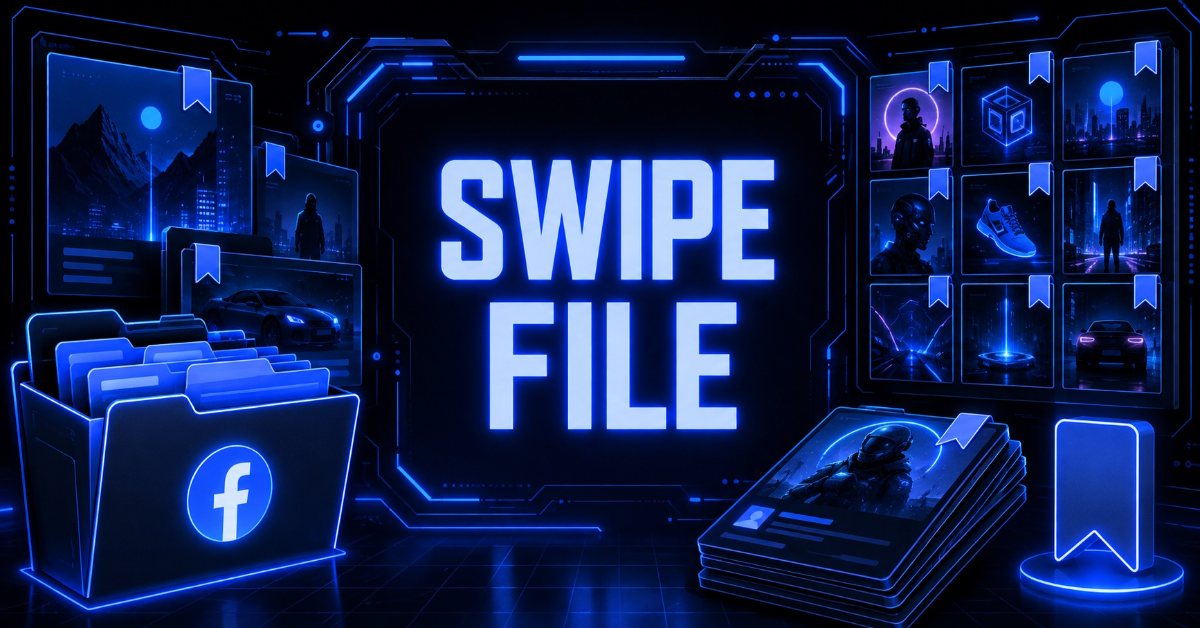
- A Facebook ads swipe file is a stored, tagged set of competitor ads held with the copy, creative, destination page, and start date attached to each entry.
- Four patterns cover most swipe-worthy ads: the evergreen benefit ad, the limited edition drop, the offer stack with risk reversal, and the creator partnership.
- Each entry should record the primary text, creative, headline, destination URL, and start date, then get an angle tag when you save it.
- Creating one runs through five stages: pick eight to twelve advertisers, pull their ads by page, store the full ad, tag by angle, then prune monthly.
- At GetHookd, users can save ads permanently, even after they go offline, while its Brand Spy feature identifies which competitor ads are being actively scaled rather than merely running.
Building a Swipe File From Live Ads
A Facebook ads swipe file is a tagged library of competitor ads saved with their copy, creative, and destination page attached. Build one by pulling ads from advertisers currently spending and storing them in a format you can search months later. Live ads are the only useful source, since a curated inspiration gallery cannot tell you whether an ad survived its first week of budget.
The process of creating a Facebook ads swipe file fails far more often at the storage stage than at the collection stage. Screenshots are the usual culprit, keeping the image and discarding the destination URL, the run history, and the opening line, which are the parts you need when briefing your own version.
Timing compounds that loss. Once an advertiser switches a standard commercial ad off, it stops surfacing in Facebook Ad Library search in most markets, so anything noted but never stored properly becomes unrecoverable rather than merely inconvenient.

GetHookd: Turn Competitor Intelligence Into Your Next Winning Ad
GetHookd reveals which ads your competitors are actively scaling, not just running. Spy on their best-performing creatives, landing pages, and traffic strategies, then turn proven concepts into testable campaigns in seconds with AI-powered script generation and creative cloning.
What You Get:- ✓ Brand Spy to decode competitor ad strategies in real-time
- ✓ AI script generation and ad cloning for instant variations
- ✓ Performance scoring based on actual ad behavior, not vanity metrics
- ✓ Creative Analyzer to identify and scale your top performers
Facebook Ads Swipe File Examples
The four ads below were active in the Meta Ad Library on 19 August 2026, all from The Ridge. Reading one advertiser’s live set helps because each ad does a different job.
1. The Evergreen Benefit Ad
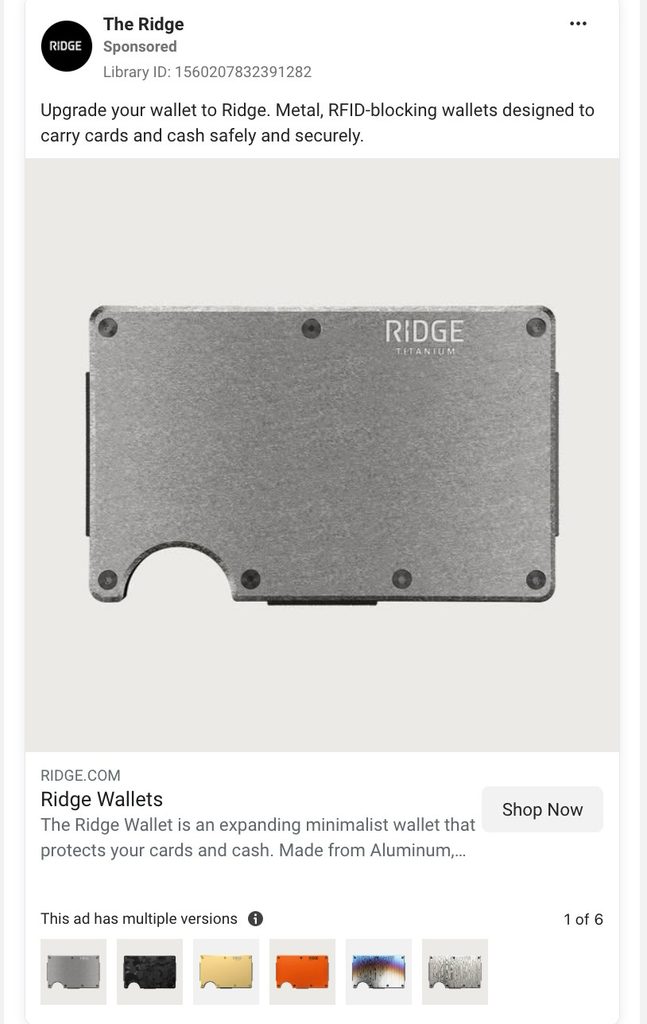
This ad has run since 26 June 2026, making it one of the longest-running entries in the advertiser’s active set. The primary text is two short sentences naming the product category and its two main benefits, RFID blocking and secure card storage, with no offer, no discount, and no urgency.
The structural detail worth copying is the division of labor. The primary text carries the benefit, the headline names the product line, and the link description covers the material specifications, so each element does its part.
The ad also runs multiple versions, routing to different product variants while keeping the copy identical. The creative and the message stay fixed while the destination changes, which is a cheap way to test which SKU converts a shared audience best.
2. The Limited Edition Drop
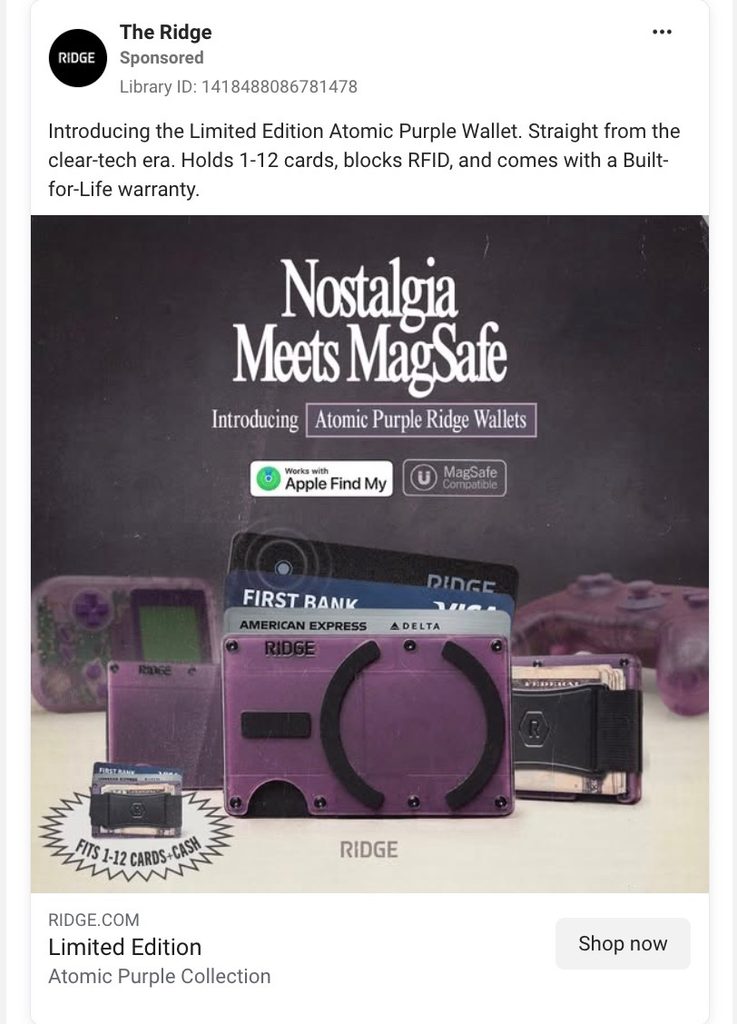
Launched on 18 July 2026, this ad sells a colorway rather than a product. The copy opens on the release, adds a nostalgia reference to the clear-cased tech era, then closes on three concrete specifications and a lifetime warranty.
The angle is scarcity applied to an existing SKU. Nothing new was manufactured, only a new reason to buy the current product now, which is the cheapest form of urgency available to a brand with a stable catalog.
The same message runs as both a static image ad and a video ad under separate library entries. Logging both versions is worth the extra minute, since it shows you the advertiser committed production budget to the angle rather than testing it once and moving on.
3. The Offer Stack With Risk Reversal
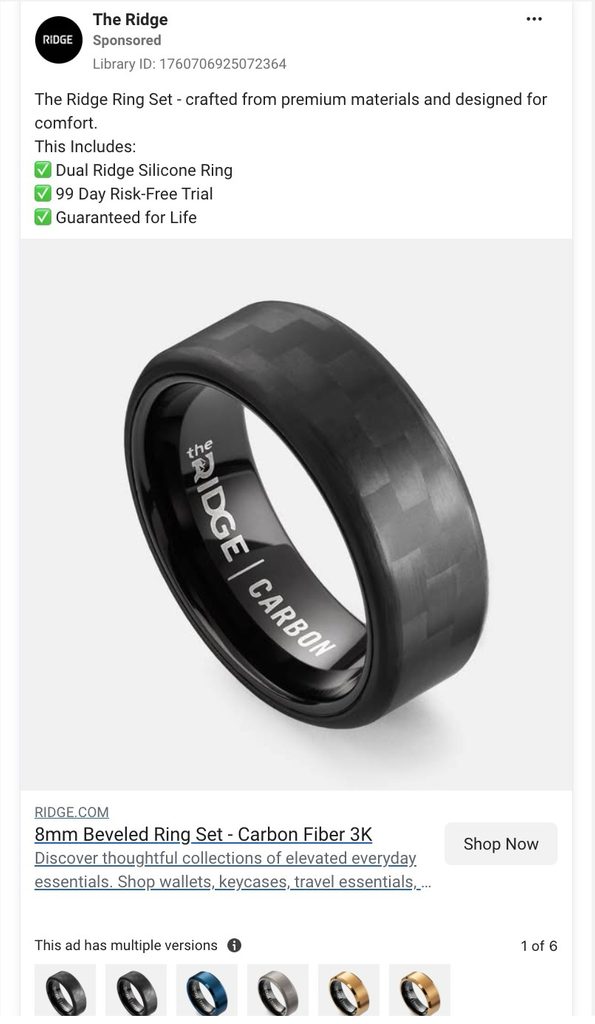
Running since 24 July 2026, this ad opens with a one-line product description, then lists what is included with tick marks. Two of the three list items are guarantees rather than product features, covering a risk-free trial window and a lifetime replacement.
That ratio is the lesson. The advertiser decided the obstacle was commitment rather than comprehension, and built the list to answer the objection instead of describing the product further.
A near-identical version of the ad runs under a separate entry with a different opening clause and the same tick-mark block underneath. The advertiser is testing the first line in isolation while holding the offer stack constant, which is a clean structure to copy when you want a readable test result.
4. The Creator Partnership Ad
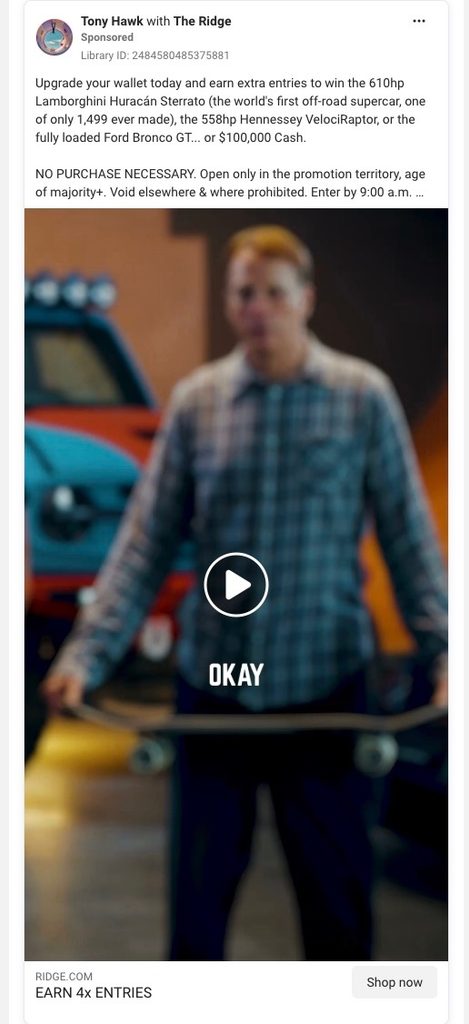
This ad started on 29 July 2026 and runs under Tony Hawk’s page with The Ridge as the paying advertiser. The library notes that four separate ads use the same creative and text, and the identical copy also appears under at least three other creator accounts.
The mechanism is borrowed trust. The creator’s name and profile image appear before any product does, so the ad reaches the feed carrying an existing relationship rather than a cold brand impression.
The distribution pattern matters more than the creative here. One message running across several creator pages at once means the advertiser is buying reach through personalities rather than testing whether the partnership format works, and that only happens after the format has already proven out.
How to Create a Facebook Ads Swipe File
1. Pick 8 to 12 Advertisers
Choose direct competitors plus 2 or 3 brands outside your category that sell to a similar buyer. A short list gets reviewed every month, and a long one does not, so the constraint protects the habit rather than limiting the file.
2. Pull Their Ads by Page, Not Keyword
Searching the Meta Ad Library by advertiser page returns that brand’s full active set in one view. Keyword searches return scattered matches across unrelated advertisers and miss any ad that never uses your search term in its copy.
3. Store the Ad, Not a Picture of It
Capture the primary text, creative, headline, destination URL, and start date in the same entry. This stage decides whether the file works in six months, since every other stage can be repaired later and this one cannot.
4. Tag by Angle & Format Before Closing the Tab
Use a fixed vocabulary such as scarcity, risk reversal, creator, comparison, or founder story. Tags applied at the moment of saving are the only tags that get applied, and an untagged file is a folder you scroll rather than search.
5. Prune Monthly
Check which saved ads are still live. An ad that has disappeared since your last review tells you something stopped working, and clearing dead weight keeps the file small enough to stay useful under deadline.
Keep the Ads You Save Usable With GetHookd
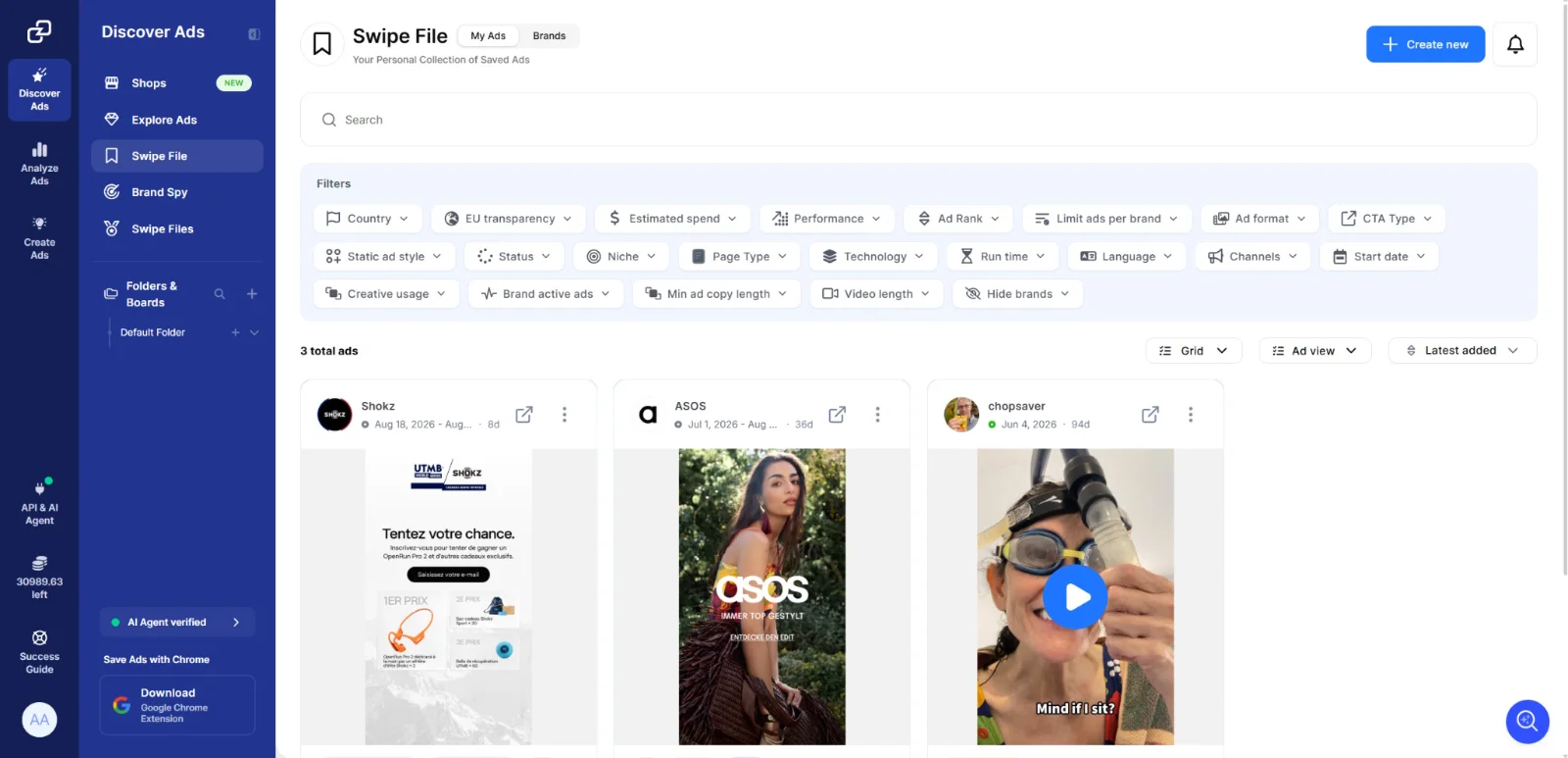
A swipe file only pays off if the entries outlast the campaigns that produced them. Deactivated ads drop out of library search, tagged entries stay findable under deadline, and folders of outdated screenshots deliver neither.
At GetHookd, the Swipe File lets you save ads for inspiration, analysis, and reference, with the full creative, ad copy, landing page, performance score, and other details kept together. You can organize saved ads into boards and search or filter them when you need them. Brand Spy complements this by showing which competitor ads are actively being scaled, so you can move from collecting examples to understanding what competitors are pushing. Start a free trial and build a swipe file you can keep using long after you first find the ad.
Frequently Asked Questions (FAQs)
How many ads should a swipe file hold?
Fewer than most people assume. Two hundred tagged ads you can search will outperform several thousand loose screenshots, because you only use the file when you need a specific angle quickly.
How often should I check competitor ads?
Monthly suits most advertisers. Weekly checks make sense during a competitor’s launch window or a seasonal push, when new creative appears faster and older ads get cycled out sooner than usual.
Is it legal to save competitor ads for reference?
Viewing and recording ads from the Meta Ad Library is permitted, since the library exists as a public transparency tool. Copying a competitor’s creative assets or copy directly into your own ads raises separate intellectual property questions, so use saved ads to inform structure and angle rather than duplicating them.
Do I need technical skills to build a swipe file?
No. The work is organizational rather than technical and requires no code, API access, or scraping setup. Most swipe files fail because of inconsistent tagging rather than tooling.
What does GetHookd’s Brand Spy feature add to a swipe file?
GetHookd’s Brand Spy shows a competitor’s top ads, landing pages, and traffic sources in one view, so you can separate scaled creative from routine tests. That distinction decides which ads earn a place in your file and which you skip.
*Note: Pricing and/or product availability mentioned in this post are subject to change. Please check our website for current pricing and stock information before making a purchase.