
Key Takeaways
- Instagram Explore ads are paid placements that appear in the scrollable feed users land in after tapping a post from the Explore tab, and they run as an extension of Instagram Feed ads, which means Explore cannot be selected as a standalone placement, and every ad must be eligible for the Feed first.
- The most reliable specs for Instagram Explore are 4:5 vertical at 1080 x 1350 pixels for single image and video ads and 1:1 square at 1080 x 1080 pixels for carousels, with image files capped at 30MB, video files capped at 4GB, and JPG, PNG, MP4, or MOV as the supported formats.
- The strongest Instagram Explore image, video, and carousel ad examples share three traits, which are a single hero subject in the opening frame, a visual style that mirrors trending organic content in the niche, and a hook that lands within the first one to two seconds before users scroll past.
- The highest-converting tips for Instagram Explore ads are matching creative to the discovery mindset of the user, routing every click to a dedicated landing page that mirrors the ad’s headline and offer, and testing custom video thumbnails against Meta’s auto-selected frame to lift click-through rates.
- GetHookd gives you access to 65M+ Meta ads to see which Instagram Explore creatives competitors are actively scaling, plus AI tools like Brand Spy, Clone Ads, and Video Scripts to turn those insights into testable ads in minutes.
How Do Instagram Explore Ads Work?
Instagram Explore is one of the highest-intent placements on Meta, reaching users in active discovery mode. The catch is that Explore cannot be selected on its own. Every ad must be eligible for the Instagram Feed first, so specs and creative need to be planned around Feed requirements.
What separates winners from wasted spend is how closely the creative mirrors organic content trending in the niche. Single image, video, and carousel formats are supported. Collection and Stories-only ads are not.
That is where GetHookd fits in. Our searchable database of 65M+ Meta ads lets you surface the exact Explore creatives competitors have committed budget to, then use Brand Spy, Clone Ads, and Video Scripts to turn proven concepts into testable variations in minutes.
To enable the placement, choose Advantage+ Placements in Meta Ads Manager, or manually check the Explore box under Instagram.

GetHookd: Turn Competitor Intelligence Into Your Next Winning Ad
GetHookd reveals which ads your competitors are actively scaling—not just running. Spy on their best-performing creatives, landing pages, and traffic strategies, then turn proven concepts into testable campaigns in seconds with AI-powered script generation and creative cloning.
What You Get:- ✓ Brand Spy to decode competitor ad strategies in real-time
- ✓ AI script generation and ad cloning for instant variations
- ✓ Performance scoring based on actual ad behavior, not vanity metrics
- ✓ Creative Analyzer to identify and scale your top performers
Instagram Explore Ad Specs for Image Ads
Recommended Dimensions & Aspect Ratios
The recommended aspect ratio for Instagram Explore image ads is 4:5 vertical. Square (1:1) and landscape (1.91:1) are also supported.
For vertical ads, the ideal dimensions are 1080 x 1350 pixels. Square ads should be 1080 x 1080 pixels.
Vertical creative claims more screen real estate on mobile and typically performs better in this placement.
File Type & Size
Instagram Explore image ads support JPG and PNG file formats.
The maximum file size allowed is 30MB. Keeping images well under that limit helps load speed, especially on slower mobile connections.
Resolution Requirements
The minimum resolution for an image ad in Explore is 1080 x 1080 pixels.
Always design at full 1080p resolution or higher. Instagram compresses images during upload, so starting with a high-res file ensures the final output stays sharp on retina displays.
Caption Limits
Your ad caption can technically be up to 2,200 characters, but only the first 125 characters show before the “more” cutoff, so lead with your strongest message.
Instagram Explore Ad Specs for Video Ads
Video Length
Instagram Explore video ads must be at least 1 second and no more than 60 minutes per Meta’s Feed video specs. That said, shorter is almost always better.
File Size
The maximum file size for video ads is 4GB. Exporting at the smallest file size that maintains visual quality is the smarter move for faster load times across varying network speeds.
Format Requirements
The recommended video formats are MP4 or MOV.
Meta supports a range of codecs, but H.264 compression with a square pixel aspect ratio and a fixed frame rate consistently delivers the cleanest playback.
Audio should be encoded in AAC stereo at 128kbps or higher.
Aspect Ratio & Resolution
- Recommended aspect ratio: 4:5 (vertical) or 1:1 (square)
- Also supported: 1.91:1 (landscape) and 9:16
- Minimum resolution: 1080 x 1080 pixels
- Recommended resolution: 1080 x 1350 pixels for 4:5 vertical
- Frame rate: 30 fps or lower
If you are repurposing content from other channels, reformat it to vertical before running it here. A landscape video forced into a mobile feed loses visual impact fast.
Instagram Explore Ad Specs: Carousel Ads
File Size
Image cards within a carousel cap at 30MB per card. Video cards cap at 4GB per card.
Keep individual card file sizes as lean as possible without sacrificing quality. When users are swiping through multiple cards on a mobile connection, bloated file sizes slow down the experience and increase the chance someone drops off before reaching your final CTA card.
Format Requirements
Image cards support JPG and PNG. Video cards support MP4 and MOV, with H.264 encoding recommended for compatibility.
All cards in a single carousel must use the same aspect ratio. You cannot mix a 1:1 image card with a 4:5 video card in the same unit. Consistency across cards is both a technical requirement and a visual best practice.
Video Length & Resolution
- Minimum video length per card: 1 second
- Maximum video length per card: 240 minutes
- Recommended video length per card: 15 seconds or less
- Minimum resolution: 1080 x 1080 pixels per card
- Most commonly used aspect ratio: 1:1 square
Autoplay is enabled for video carousel cards, but sound is off by default. Design your video cards to convey the core message visually, with captions or text overlays carrying the narrative when audio is unavailable.
Instagram Explore Ads Specs at a Glance
| Specs | Image Ads | Video Ads | Carousel Ads |
| Recommended Ratio | 1:1 or 4:5 | 1:1 or 4:5 | 1:1 |
| Min Resolution | 1080x1080px | 1080x1080px | 1080x1080px |
| Max File Size | 30MB | 4GB | 30MB (image) / 4GB (video) |
| File Format | JPG, PNG | MP4, MOV | JPG, PNG, MP4, MOV |
| Max Video Length | N/A | 60 minutes | 240 minutes per card (15 sec recommended) |
| Max Caption Length | 2,200 characters | 2,200 characters | 2,200 characters |
Examples of Instagram Explore Ads
Image Ad Example: Clean Visual With a Strong CTA
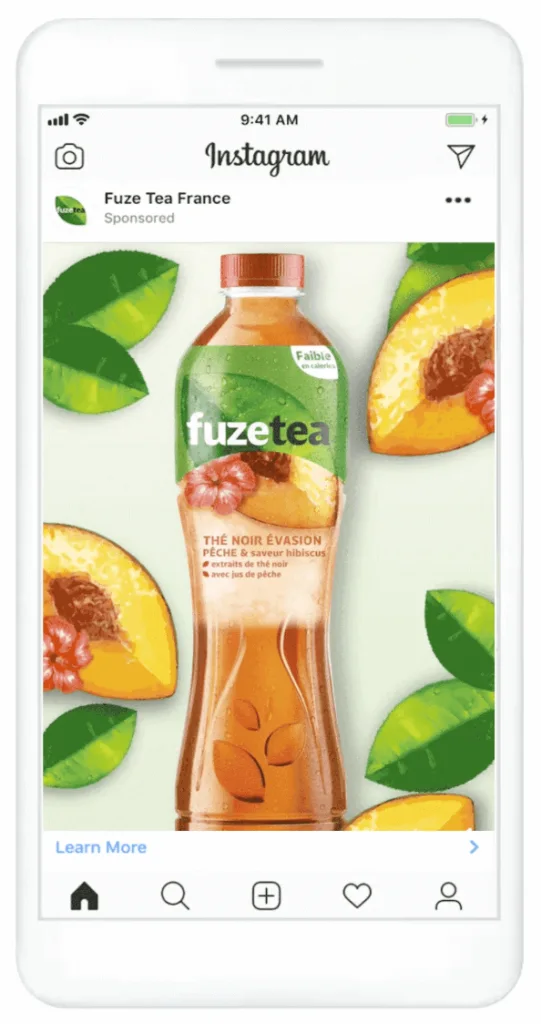
The strongest Explore image ads lead with one clear hero subject, minimal on-image text, and a single CTA. Because Explore users scan quickly, the visual has to communicate the product, mood, and offer in seconds.
Cluttered creative with multiple focal points, heavy badges, or stacked text overlays loses to a clean, well-composed shot every time.
The Fuze Tea France ad above is a good model. The product is center-frame, the supporting elements (peach slices, leaves) frame it without competing for attention, and a single CTA anchors the bottom.
Video Ad Example: Short-Form Content That Stops the Scroll
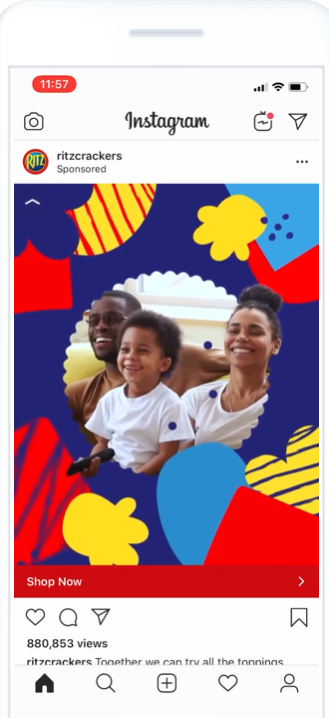
The strongest Explore video ads earn attention in the first few seconds with movement, color, or a clear hook. Because sound is off by default, the visual story has to land without audio.
Stacking bold colors, motion graphics, or a recognizable face in the opening frame consistently outperforms slow-build intros that lead with a logo or product shot. The Ritz Crackers ad above features playful pattern overlays that draw the eye immediately, while the family at the center adds a relatable human element that holds attention.
Carousel Ad Example: Telling a Story Across Multiple Frames
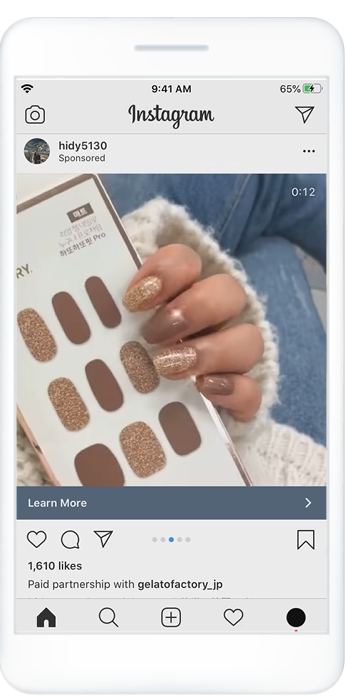
The strongest Explore carousels treat each card as one beat in a sequence, with the most compelling visual or hook leading the first card to earn the swipe.
Product showcases, before-and-after sequences, and feature breakdowns work especially well because they reward the swipe with progressive payoff rather than repeating the same message across every card.
Hidy5130’s paid partnership ad does this well. The first card opens with a close-up product-in-use shot, hands modeling the nail wraps directly against the packaging, which immediately communicates the product, the result, and the application style in a single frame.
Tips to Get More Conversions From Instagram Explore Ads
Match Your Creative to the Discovery Mindset of Explore Users
Explore users are in active discovery mode, scrolling. Your ad has roughly one to two seconds to earn attention, so front-load the strongest visual element and make the value proposition impossible to miss. If your creative could run as an organic post without feeling out of place, you are on the right track.
Use Trending Aesthetics to Blend In With Organic Content
Ads that mirror the visual language of what is trending in your niche earn longer view times because they do not trigger the “this is an ad” skip reflex. Study the organic content dominating Explore for your audience’s interests, whether that is a color palette, editing style, or content format, and match that visual dialect.
Send Ad Clicks to a Dedicated Landing Page
Sending Explore traffic to a generic homepage is one of the biggest conversion leaks in this placement. Build a dedicated post-click landing page that mirrors the ad’s headline, hero visual, and CTA exactly.
Test Video Thumbnails to Improve Click-Through Rates
Always test a custom thumbnail against Meta’s auto-selected frame. Treat it like a static image ad with a clear subject and high contrast, since it needs to work even if the video never plays.
Before You Launch: Instagram Explore Ad Conversion Checklist
- Creative is vertical (4:5) and optimized for mobile-first viewing
- Hook appears in the first 1 to 2 seconds (video) or dominates the top third (image)
- Ad copy leads with the strongest message in the first 125 characters
- CTA is specific and action-oriented (“Get 20% Off Today” beats “Learn More”)
- Destination is a dedicated landing page matched to the ad’s offer
- Video captions are enabled for silent viewing
- Creative aesthetic matches organic Explore content in your niche
- A/B test is set up to compare at least two creative variations
Build Instagram Explore Ads That Convert With GetHookd
Instagram Explore is a discovery-mode placement, which means the creative that wins here looks closer to organic content than a typical ad. The challenge is knowing what “organic-looking” actually performs in your specific niche before you spend a dollar testing it.
That is where GetHookd fits in. Our searchable database of 65M+ Meta ads lets you filter by niche, format, and run time to surface the exact Explore-friendly creatives competitors have committed budget to over weeks or months. Once you spot the visual language that resonates, our Clone Ads, Image Templates, and Video Scripts tools help you build native-looking variations without starting from a blank canvas.
Start your GetHookd free trial today.
Frequently Asked Questions (FAQs)
Do Instagram Explore ads appear directly in the Explore grid?
No. Explore ads do not appear in the main grid itself. They show up in the scrollable content feed that opens after a user taps a piece of content from the Explore tab, always labeled as “Sponsored.”
Can you reuse the existing Instagram Feed ad creative for Explore ads?
Yes, Explore shares the same technical specs as the Instagram Feed, so any Feed creative is eligible for Explore. That said, vertical formats (4:5 or 9:16) outperform square or landscape on this mobile-first social network.
What are the best-performing ad formats for Instagram Explore?
The strongest performers are short-form vertical video and clean, single-image ads that match the organic look of Explore content. To see what is working in your niche, GetHookd lets you search 65M+ Meta ads by format and performance, so you can model proven creatives instead of guessing. Note that Collection ads are not supported in Explore, so testing should begin with video and image.
How do you enable Instagram Explore as an ad placement in Meta Ads Manager?
Choose Advantage+ placements at the ad set level to include Explore automatically, or pick Manual placements and check Instagram under Feeds. Explore cannot be selected in isolation. It only delivers when Instagram Feed is also enabled.
*Note: Pricing and/or product availability mentioned in this post are subject to change. Please check our website for current pricing and stock information before making a purchase.