
Key Takeaways
- Instagram Story Carousel Ads are paid Story placements with two to ten swipeable cards that run inside a single Story slot, giving brands significantly more screen time and narrative control than a single-frame ad.
- The four formats that consistently perform well are Product Reveal, Step-by-Step Tutorial, Social Proof Stack, and Before-and-After, each built around a distinct sequence that guides the viewer toward a CTA.
- Creating a Story Carousel Ad requires selecting a compatible objective in Meta Ads Manager, enabling Instagram Stories under Manual Placements, and uploading vertical 9:16 assets at 1080 x 1920 pixels.
- After launching, checking per-card performance within the first 48 hours and replacing only the weakest card is far more efficient than rebuilding the full Carousel from scratch.
- GetHookd surfaces which Story Carousel Ads competitors are actively scaling across 65M+ Meta ads, so you can build from what is already proven rather than starting from guesswork.
How Story Carousel Ads Work on Instagram
Instagram Story Carousel Ads give brands two to ten swipeable cards inside a single Story slot, but the format only delivers results when the sequence, hook, and CTA are built around what already works in your niche. Most advertisers waste time guessing at angles that proven competitors have already tested and moved past.
That is where GetHookd changes the process. Instead of building Carousels from scratch, GetHookd surfaces which Story Carousel sequences competitors are actively scaling across 65M+ Meta ads, so every creative decision starts from real performance data rather than assumptions.
This guide walks through four high-performing formats, a step-by-step setup inside Meta Ads Manager, and how to use competitor intelligence to build Carousels that convert faster.

GetHookd: Turn Competitor Intelligence Into Your Next Winning Ad
GetHookd reveals which ads your competitors are actively scaling—not just running. Spy on their best-performing creatives, landing pages, and traffic strategies, then turn proven concepts into testable campaigns in seconds with AI-powered script generation and creative cloning.
What You Get:- ✓ Brand Spy to decode competitor ad strategies in real-time
- ✓ AI script generation and ad cloning for instant variations
- ✓ Performance scoring based on actual ad behavior, not vanity metrics
- ✓ Creative Analyzer to identify and scale your top performers
What Are Instagram Story Carousel Ads?
Instagram Story Carousel Ads are paid Story placements that string two to ten cards (images, videos, or a mix) inside a single Story slot. Viewers either tap through manually or let the cards auto-advance, which gives the ad far more screen time than a single-frame Story.
Each card runs for up to fifteen seconds for video or five seconds for static imagery. Each card maps to one campaign objective, one budget, and one targeting set, but you can attach a separate destination URL per card if your funnel routes traffic to different pages.
The format is built inside Meta Ads Manager and surfaces across Instagram Stories. Facebook Stories placement is optional and controlled in the placements panel. Reels and in-feed placements are separate and do not run the same Carousel asset.
Brands use Carousels in Stories to deliver a short narrative that a single frame cannot. A typical sequence pairs a curiosity hook on card one, a product or proof detail on card two, and a direct response CTA on card three.
Instagram Story Carousel Ad Examples
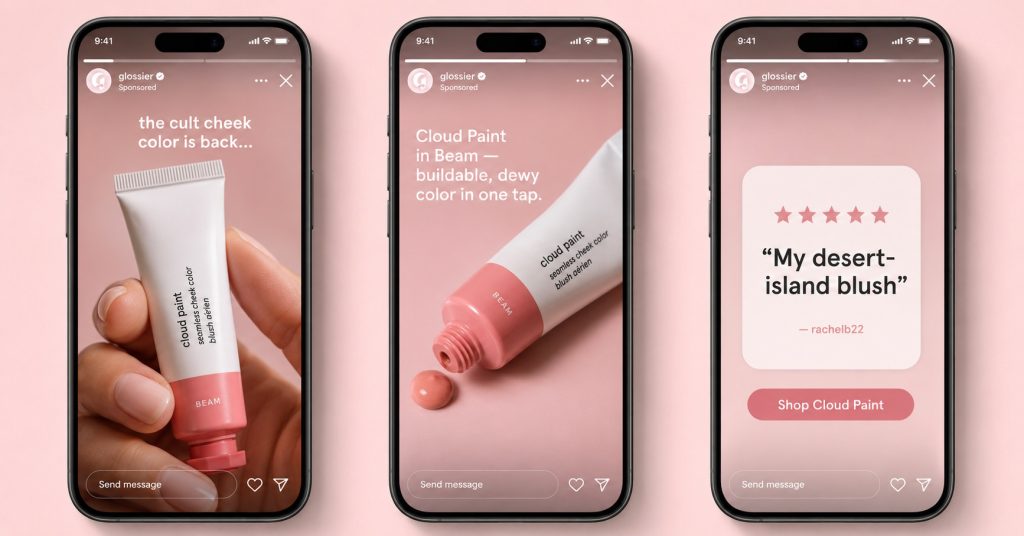
1. Product Reveal Format
This format partially hides the product on card one (close-up, packaging only, or teaser copy), shows the full product on card two with one clear benefit, and closes with social proof plus a swipe-up link on card three. Beauty, supplement, and gadget brands rely heavily on this sequence.
The pattern works because Stories reward curiosity. A reveal sequence trains the viewer to wait for the next card, thereby extending average watch time and reducing skip rate. Pair it with a high-contrast first frame and on-screen text that hints at the payoff without giving it away.
2. Step-by-Step Tutorial Format
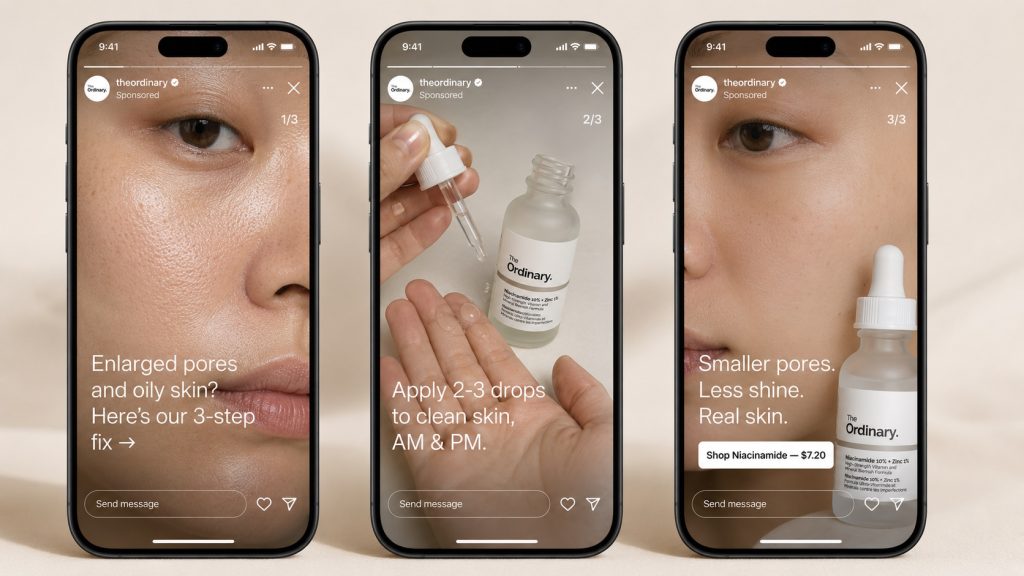
Tutorial Carousels show a three-step process across three cards: problem, application, result. Skincare, cleaning products, and software demos perform well here because each card carries a distinct visual change the viewer can track.
Keep on-screen text to 10 words per card, and use bold captions for sound-off viewers. The final card should always contain the offer and the destination URL. Brands often add a small step indicator in the corner (1/3, 2/3, 3/3) to show how much content is left.
3. Social Proof Stack
This format dedicates each card to a separate proof point: a customer testimonial visual on card one, a rating screenshot or press logo on card two, and the product plus CTA on card three. It suits trust-heavy categories such as health, finance, and high-ticket DTC brands where buyers need reassurance before clicking.
The format also reduces creative production cost because much of the asset content is sourced from existing reviews, ratings, and press mentions you already own. Treat each card as a single, focused proof element rather than stacking multiple testimonials into one frame.
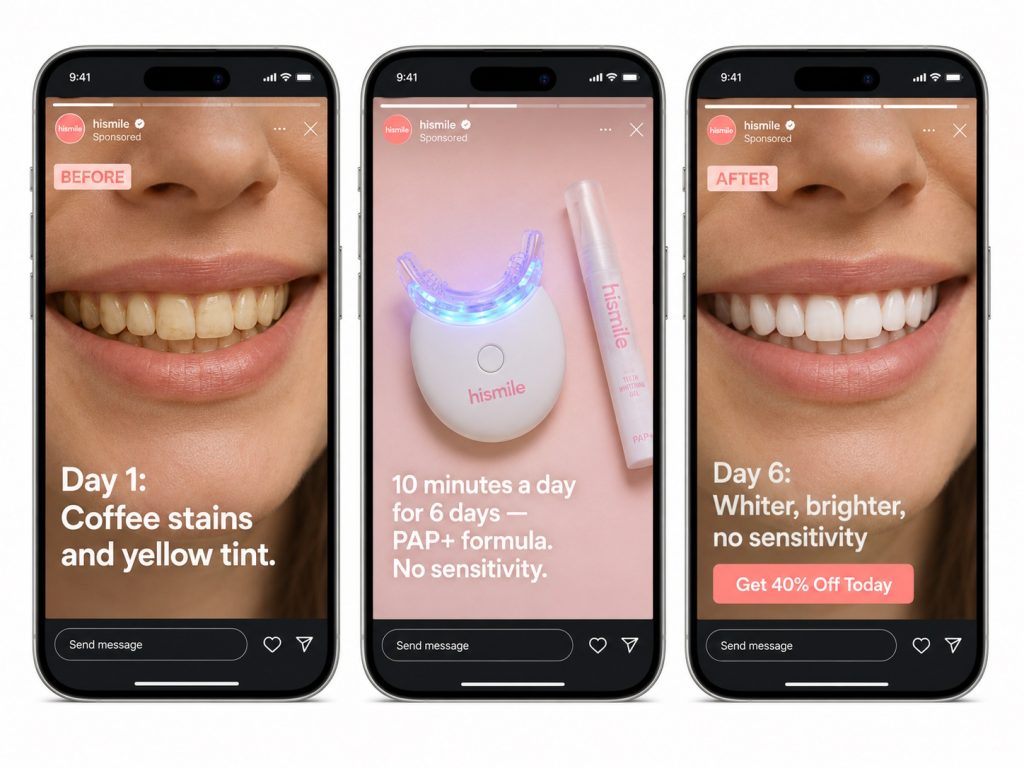
4. Before-and-After Format
Card one shows the “before” state, card two shows the transformation in progress, and card three shows the “after” plus the offer. Fitness, dental, home cleaning, and pet brands run this sequence consistently because the visual change carries the message without heavy copy.
Carousel format works better than a single-frame split-screen here because viewers process change more clearly across separate cards than within one cluttered frame. Add a date stamp on each card to amplify the time-elapsed effect and reinforce credibility.
Instagram Story Carousel Examples at a Glance
| Format | Card 1 | Card 2 | Card 3 | Best For |
| Product Reveal | Teaser | Full reveal + benefit | Proof + CTA | Beauty, gadgets, supplements |
| Step-by-Step Tutorial | Problem | Application | Result + CTA | Skincare, software, cleaning |
| Social Proof Stack | Testimonial | Rating or press | Product + CTA | Health, finance, high-ticket DTC |
| Before-and-After | Before state | In-progress | After + CTA | Fitness, dental, home services |
How to Create an Instagram Story Carousel Ad?
Follow these steps inside Meta Ads Manager to launch a compliant Story Carousel Ad.
- Open Meta Ads Manager and click Create at the campaign level.
- Choose an objective that supports Carousel in Stories, such as Traffic, Sales, Leads, Engagement, or Awareness.
- Set your budget, schedule, and audience targeting at the ad set level.
- Under Placements, select Manual Placements and confirm Instagram Stories is checked. Carousel will only display in Stories when this placement is active.
- At the ad level, choose Carousel as the format.
- Upload between two and ten cards. Use vertical 9:16 assets at 1080 x 1920 pixels for best display.
- Add headlines, primary text, and destination URLs for each card. Use unique URLs per card or keep them uniform for a single landing page.
- Pick your CTA button (Shop Now, Learn More, Sign Up, etc.). The button copy can vary per card if your offer changes between frames.
- Confirm the Facebook Pixel or Conversions API is firing on every destination URL so reporting stays accurate.
- Review the Story preview to check pacing, then publish.
Here are a few asset constraints to know before you upload.
- Static images run for five seconds per card.
- Video runs up to fifteen seconds per card.
- File size is 30 MB for images and 4 GB for video.
- Captions are recommended on every video card because most Story viewers watch muted.
Once the Carousel is live, monitor it in Ads Manager for the first 48 hours. Check the per-card breakdown to see which frame is dropping viewers, then swap out the weakest card instead of rebuilding the full Carousel from scratch.
Why GetHookd Stands Out for Story Carousel Ad Research
Story Carousel Ads work when the sequence is tight, the first frame earns the swipe, and every card moves the viewer one step closer to a CTA. The four formats covered here give you a repeatable structure, and the setup steps above ensure your assets deliver cleanly inside Instagram Stories. The harder problem is knowing which Carousel angles are actually scaling in your niche right now, because the public Meta Ad Library shows live ads but no performance context.
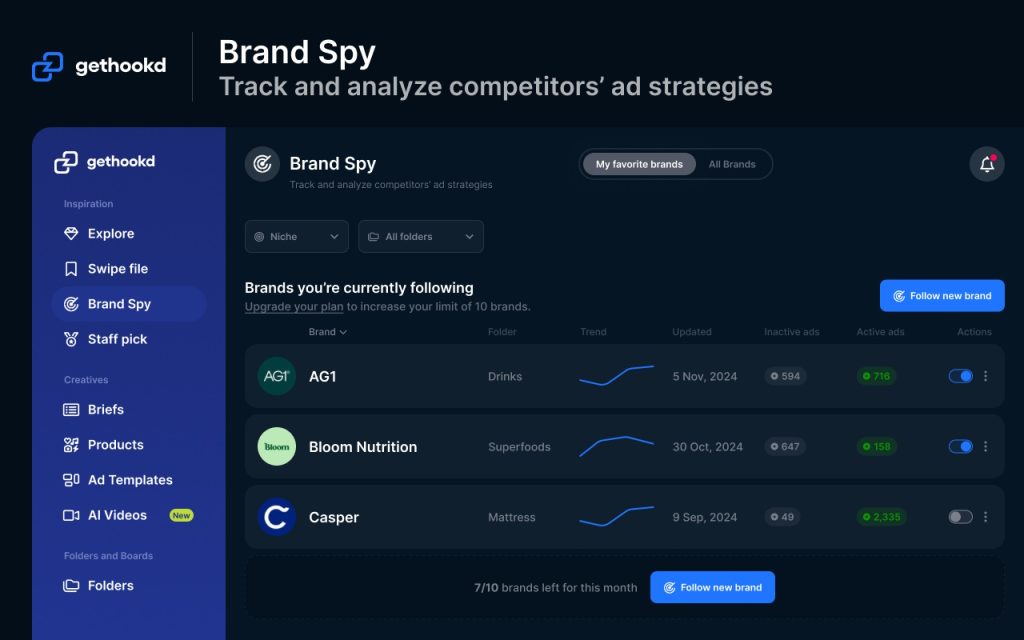
At GetHookd, we solve that. Our Brand Spy feature surfaces the Carousels competitors are putting real budget behind, our Creative Analyzer breaks down hooks and angles across 65M+ high-performing Meta ads, and our AI script and Clone Ads tools turn proven structures into testable variants in minutes. Try GetHookd to start finding winning Story Carousels in your niche today.
Start your free GetHookd trial today.
Frequently Asked Questions (FAQs)
What is the carousel ad on Instagram stories?
An Instagram Story Carousel Ad is a paid Story placement that strings two to ten swipeable cards inside a single ad slot. Each card can be a static image or a short video, and viewers tap through manually or let the cards auto-advance. The format is built and managed through Meta Ads Manager and gives brands more screen time and narrative depth than a single-frame Story ad.
How to do carousel ads on Instagram Story?
To run a Carousel Ad in Instagram Stories, open Meta Ads Manager and create a new campaign with an objective that supports Carousel, such as Traffic, Sales, or Leads. At the ad set level, select Manual Placements and confirm Instagram Stories is active. At the ad level, choose Carousel as the format, upload between two and ten vertical 9:16 cards at 1080 x 1920 pixels, add headlines and destination URLs for each card, and select a CTA button before publishing.
How many cards can an Instagram Story Carousel Ad include?
Story Carousel Ads support between two and ten cards inside Meta Ads Manager, though most high performers use three. Each card runs for 5 seconds for static images or up to 15 seconds for video, giving the full Carousel meaningful screen time in a viewer’s Story feed.
Can I use different destination links on each Carousel card?
Yes. Meta Ads Manager allows a unique destination URL per card, which is useful if your funnel routes traffic to category pages, product pages, or quiz flows. Many advertisers still point all cards to the same landing page to keep tracking simple and conversion attribution clean.
What makes GetHookd different from the Meta Ad Library?
The Meta Ad Library shows live ads but no performance context. GetHookd analyses 65M+ Meta ads, surfaces which Carousels competitors are actively scaling, and includes AI script generation and ad cloning so you move from research to testable creative inside one workflow.
*Note: Pricing and/or product availability mentioned in this post are subject to change. Please check our website for current pricing and stock information before making a purchase.