Key Takeaways
- The Meta Ad Library API provides programmatic access to Meta’s public ad archive, returning structured JSON that you can integrate into your own tools.
- To generate an access token, you need a verified Meta account, a developer app, and the ads_read permission added in the Graph API Explorer before any call to the archive will work.
- The token from the Explorer is short-lived and lasts one to two hours, so exchange it for a 60-day long-lived token and build a refresh flow before running any automated pipeline.
- The API’s biggest limit for commercial research is scope: outside the EU and UK, it returns only political and social-issue ads, and you cannot look up a single ad by its ID.
- GetHookd solves both limits with commercial ad data in every region, single ad lookup by ID, and an MCP server that connects AI tools like Claude Desktop and Cursor with no setup required.
What the Meta Ad Library API Does & How to Access It
The Meta Ad Library Application Programming Interface (API) is a public interface that returns structured data from Meta’s ad archive, letting you search by keyword, Page ID, country, ad type, and date range. Requests run through the /ads_archive endpoint and return JSON you can parse, store, or feed into your own tools.
Setup takes more work than most developers expect: a verified account, a developer app, the ads_read permission, and a token that expires within hours unless you exchange it for a long-lived one.
The bigger problem is coverage. Outside the EU and UK, the API returns only political and social-issue ads, so commercial competitor research often comes back empty.
GetHookd’s REST API provides commercial ad data in every region and single-ad lookup by ID, with no identity verification or app registration. Our MCP server also lets AI tools like Claude Code and Cursor access the same data without custom API integration.

GetHookd: Turn Competitor Intelligence Into Your Next Winning Ad
GetHookd reveals which ads your competitors are actively scaling, not just running. Spy on their best-performing creatives, landing pages, and traffic strategies, then turn proven concepts into testable campaigns in seconds with AI-powered script generation and creative cloning.
What You Get:- ✓ Brand Spy to decode competitor ad strategies in real-time
- ✓ AI script generation and ad cloning for instant variations
- ✓ Performance scoring based on actual ad behavior, not vanity metrics
- ✓ Creative Analyzer to identify and scale your top performers
What You Need Before You Start
A Verified Facebook Account
You need a Facebook account and, for full access to the archive’s political and social-issue ad data, completed identity verification. Basic queries can sometimes run without it, but Meta gates the transparency fields (spend, impressions, and funding details on political ads) behind ID confirmation.
To verify, submit a government-issued ID through Meta’s flow at facebook.com/ID and confirm your country of residence. Approval usually takes one to three business days, after which your account is cleared for restricted data.
A Meta Developer App
Head to developers.facebook.com/apps and create a new app. When prompted for a type, select Business as your use case to get the correct set of products and permissions.
Give the app a clear name that reflects its purpose, something like “Ad Library Research Tool,” since Meta reviewers may evaluate it if you request advanced access.
Once created, your app receives its own App ID and App Secret, both of which you need to generate tokens. Keep the App Secret private, as it should never appear in client-side code or public repositories.
The Right Permissions on Your Token
For the Ad Library API, your token needs the ads_read permission explicitly added, and access to the archive itself is granted by the identity verification you completed earlier.
Without the right permission and verification in place, your calls to /ads_archive return a permission error even when the token is otherwise valid.
You add this permission during token generation in the Graph API Explorer, as covered in the next section. Permissions are scoped to the token itself, not your account globally, so each time you generate a new token, you re-add the permission manually.
How to Generate a Meta Ad Library API Access Token
Step 1: Open the Graph API Explorer
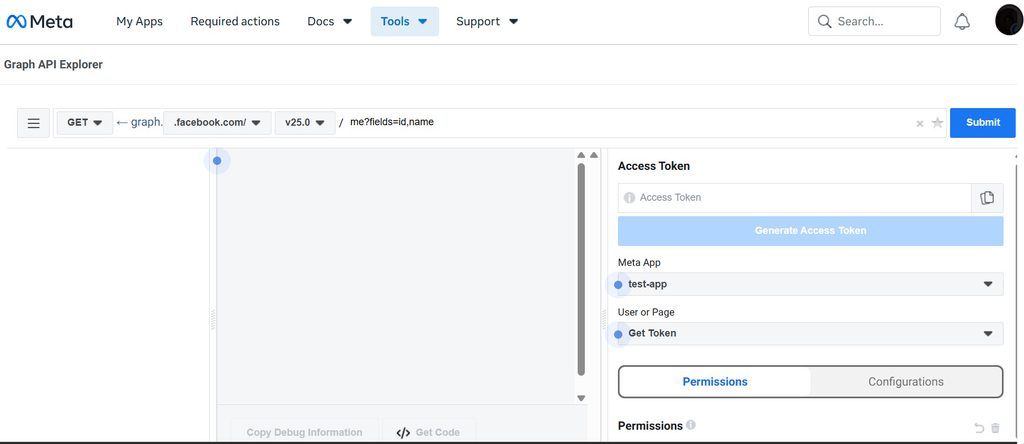
Go to developers.facebook.com/tools/explorer. A panel on the right lets you select your app, set permissions, and generate a token.
Make sure you are logged into the Facebook account that completed identity verification, since the explorer uses your active session to scope the token.
Step 2: Select Your App & Set the Required Permission
In the top-right dropdown, select the developer app you created. Then click Add a Permission and add ads_read, which authorizes the token to query the Ad Library archive.
You do not add ads_archive as a permission here, as that is the endpoint itself, and access to it comes from the identity verification you already completed.
Once ads_read appears in your permissions list, you are ready to generate the token. Double-check that the app in the dropdown matches your intended App ID, since it is easy to generate a token under the wrong app when you have multiple projects.
Step 3: Generate & Copy Your Access Token
Click Generate Access Token. Meta prompts you to authorize the app with your Facebook account, so click through the permissions dialog and confirm.
Your token appears in the Access Token field at the top of the explorer. Copy it immediately and store it somewhere secure, like an environment variable or a secrets manager, and never paste it directly into your codebase.
To confirm the token works for Ad Library access, type ads/library/ into the query field and hit Send. A JSON response in the center panel, even an empty result set, means your token is active, and your permission is configured correctly.
A permission error means you should confirm ads_read is listed under the token before regenerating.
Short-Lived vs Long-Lived Tokens: Which One Do You Need?
The token you just generated is a short-lived user access token that expires in roughly one to two hours. That is fine for testing in the Graph API Explorer, but impractical for any automated pipeline or recurring pull.
For production, exchange it for a long-lived token that stays valid for 60 days by making a server-side GET request to graph.facebook.com/oauth/access_token with your App ID, App Secret, and the short-lived token as parameters.
Even long-lived tokens expire, so build a refresh mechanism from the start if you run scheduled jobs. For a server-side token that does not expire, add a System User in Business Manager and issue the token from there, though that path requires business verification in addition to your identity confirmation.
How to Make Your First API Call
Every request to the /ads_archive endpoint follows the same structure: a base URL, required parameters, your access token, and optional filters. The core parameters are:
- ad_type: ALL, POLITICAL_AND_ISSUE_ADS, HOUSING_ADS, EMPLOYMENT_ADS, or CREDIT_ADS. Note that outside the EU and UK, ALL still returns only political and issue ads, since Meta archives commercial ads programmatically only when they ran in Europe.
- ad_reached_countries: ISO country codes for where the ads were served, such as US, GB, or AU. At least one is required.
- search_terms: Keyword string matched across ad copy and page names.
- search_page_ids: A specific Facebook Page’s numeric ID to pull its archived ads.
- fields: Comma-separated list of the data fields you want returned. The API returns very little by default, so request fields explicitly.
- limit: Results per page. In practice, the reliable ceiling is a few hundred, and large field projections throttle well before any nominal maximum, so paginate rather than pushing one huge request.
Every response is paginated. Meta returns a paging object with a next cursor, and you follow that cursor in subsequent requests to retrieve all matching results. For large pulls, build a loop that keeps requesting the next page until the cursor stops returning.
A research call usually wants id, ad_creative_bodies, ad_creative_link_titles, ad_delivery_start_time, ad_delivery_stop_time, page_name, page_id, and publisher_platforms. Spend and impressions are worth requesting too, but they populate only for political and issue ads and come back as bucketed ranges rather than exact numbers. For commercial ads, spend returns null.
Querying with curl
This command searches political and issue ads mentioning “climate” delivered in the US, requesting creative, delivery, and transparency fields:
curl -G \
“https://graph.facebook.com/v25.0/ads_archive” \
–data-urlencode “search_terms=climate” \
–data-urlencode “ad_type=POLITICAL_AND_ISSUE_ADS” \
–data-urlencode “ad_reached_countries=[‘US’]” \
–data-urlencode “fields=id,ad_creative_bodies,page_name,spend,impressions,publisher_platforms” \
–data-urlencode “limit=25” \
–data-urlencode “access_token=YOUR_ACCESS_TOKEN_HERE”
Replace YOUR_ACCESS_TOKEN_HERE with your token. Running this returns a JSON object with up to 25 matching ads and the fields you specified.
From here you can adjust search_terms, swap the country code, or add fields to shape the output. To pull commercial ads instead, set ad_reached_countries to an EU country or GB, where all ad types are archived.
Querying With JavaScript
For a Node.js integration, the fetch approach below sends the request and logs the parsed response. Store your token in an environment variable instead of hardcoding it:
const params = new URLSearchParams({
search_terms: ‘climate’,
ad_type: ‘POLITICAL_AND_ISSUE_ADS’,
ad_reached_countries: “[‘US’]”,
fields: ‘id,ad_creative_bodies,page_name,spend,impressions’,
limit: ’25’,
access_token: process.env.META_ACCESS_TOKEN
});
const response = await fetch(`https://graph.facebook.com/v25.0/ads_archive?${params}`); const data = await response.json(); console.log(data);
The Limitations of Meta Ad API
The API is powerful, but there are a few constraints. First, the API’s coverage is narrow. It returns only political and social-issue ads outside the EU and UK, and even European commercial ads are archived for roughly twelve months.
A brand researching a competitor’s commercial ads in the US will query the right Page ID and get nothing back, even though those ads appear on the Ad Library website. For any team doing global commercial research, the data simply is not there.
Beyond that, here are the real-world constraints you’ll run into:
- Rate limits: The API is heavily rate-limited, and even moderate request volumes can trigger throttling errors. Bulk pulls require built-in delays, retry logic, and careful error handling, which adds significant engineering overhead to any pipeline at scale.
- No lookup by Ad ID: The endpoint supports only search queries by keyword, Page ID, country, or date. You cannot pull a single ad by its ID.
- Incomplete media: The API returns a snapshot URL to the ad’s web preview, not direct image or video files.
- Token expiry: Long-lived tokens last 60 days, so any pipeline without a refresh flow eventually fails.
- Data as ranges: Spend and impressions come back as buckets, and only for political and social-issue ads.
GetHookd API: A Simpler Way to Access Ad Intelligence
Our API removes the friction of Meta’s setup entirely. You generate an API key, choose the scopes your integration needs, and start querying in under five minutes, with no identity verification or app registration required.
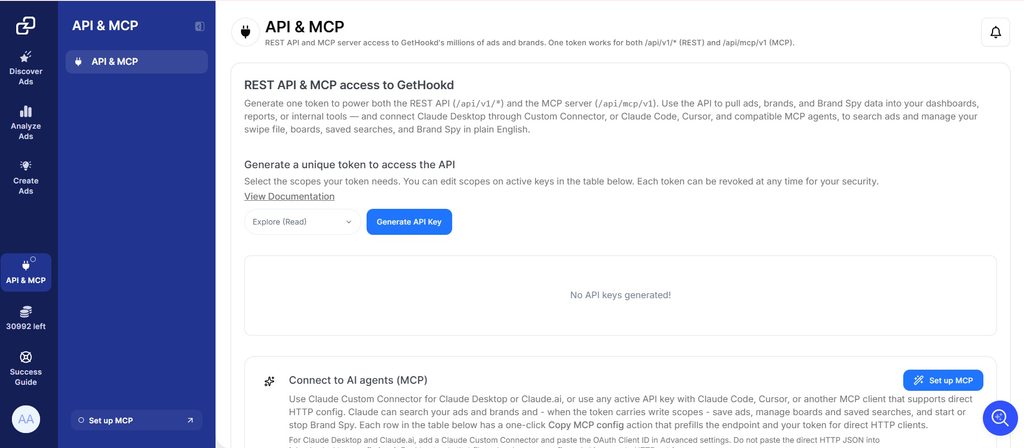
The base URL is app.gethookd.ai/api/v1, and every request uses standard bearer token authentication. From there, you can search our full ad and brand library, track competitors, and manage your saved research, each scope controlled by its own read or write permission.
One token powers both the REST API and our MCP server. Use the REST API for scripts and custom integrations, while AI tools such as Claude Desktop, Claude Code, Cursor, and other MCP-compatible clients can connect through GetHookd’s MCP server instead of integrating directly with the API.
Responses come back as clean JSON with a consistent envelope, and every search response reports credit usage so you can track consumption in real time. Individual ad and brand lookups are free. Public API access comes with any paid plan, and you can generate a separate token per integration and revoke any one without affecting the others.
Read the full API docs to see every endpoint and response schema.
Why the GetHookd API Is Best for Ad Research
Meta’s Ad Library API is a capable transparency tool, but its setup friction, expiring tokens, and political-only scope make it a poor fit for commercial competitor research. Access requires identity verification and a token refresh flow, and even then commercial ads remain unavailable outside Europe. For teams building ad intelligence into their own systems, those constraints define what the API cannot do.
GetHookd is built for commercial ad research, so engineering effort goes toward analysis rather than access. The REST API handles scripts and custom integrations, while AI tools like Claude Desktop, Claude Code, and Cursor connect through the MCP server with no extra code. Authentication is immediate, tokens are managed on your terms, and commercial ad data is available without regional restrictions. Start your GetHookd free trial today and connect your scripts or AI tools to GetHookd’s commercial ad intelligence.
Frequently Asked Questions (FAQs)
Do I need a business account to use the Meta Ad Library API?
No, a personal Facebook account with completed identity verification is what’s required. You also need a Meta Developer App, which you can create under a personal account without a formal Business Manager setup.
Why is my access token returning a permission error?
The most common cause is a missing ads_read permission on the token itself. Even with a verified account and a correctly configured app, the token needs ads_read added at generation time in the Graph API Explorer, and archive access depends on your identity verification being fully approved.
How often do access tokens expire?
Short-lived user tokens from the Graph API Explorer last one to two hours, while long-lived tokens last 60 days. For any recurring pull, exchange the short-lived token for a long-lived one immediately after generation.
Is the Meta Ad Library API free to use?
Yes, Meta charges no usage fees for requests to the /ads_archive endpoint. Your real costs are the infrastructure around it: server compute, storage, and the engineering time to handle pagination, token management, and rate limiting.
Can I search for a specific ad using its Ad ID?
No, the /ads_archive endpoint does not support direct lookup by Ad ID, so every query must be search-based using parameters like search_terms, search_page_ids, country, or ad type. The GetHookd API removes that constraint with a dedicated GET /api/v1/ads/{id} endpoint that returns a single ad directly by its ID, and the lookup consumes no credits.
*Note: Pricing and/or product availability mentioned in this post are subject to change. Please check our website for current pricing and stock information before making a purchase.