

Key Takeaways
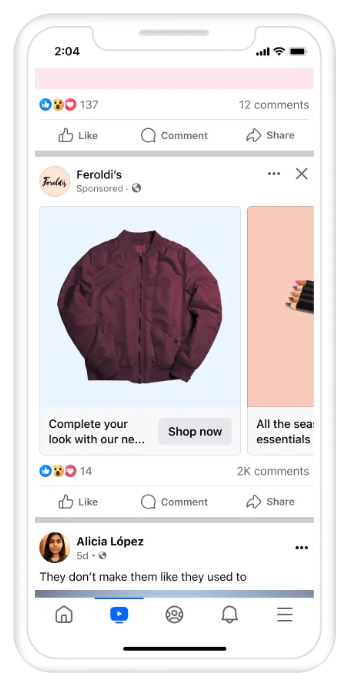
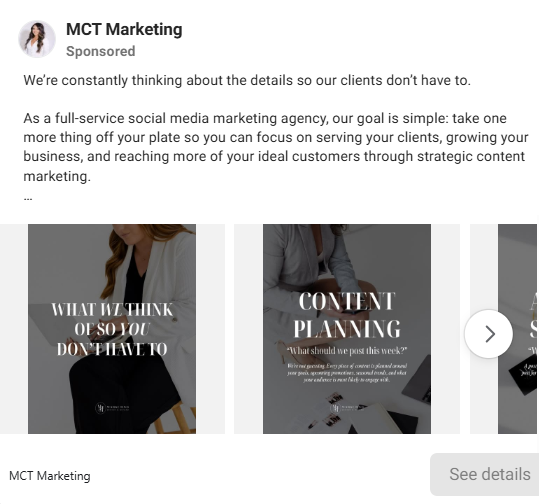
- Facebook carousel ads combine 2 to 10 cards, each with its own image or video, headline, description, link, and call to action, all built around one campaign objective.
- To build a carousel in Ads Manager, pick an objective, select the carousel format, add each card’s copy and link, and preview every placement before publishing.
- Meta recommends a 1:1 square ratio at a resolution of at least 1,080 × 1,080 px across Facebook feed, Messenger, and Audience Network, with images up to 30 MB.
- Meta recommends keeping carousel copy to 80 characters of primary text, 45 per card headline, and 18 per link description.
- GetHookd’s static ad templates and Clone Ads tool let marketers pull proven carousel structures and generate new variations in minutes instead of starting from scratch.
What Separates a Carousel That Converts from One That Gets Scrolled Past
Structure. A carousel gives you 2 to 10 cards to build a case before asking for the click, walking a viewer from hook through benefits, proof, and offer in a sequence that unfolds as they swipe. Teams that treat each card as a step in that argument see carousels outperform single images. Teams that upload disconnected product shots wonder why nobody swipes past card two.
Three things hold the sequence together: visual consistency, a card order that builds toward the offer rather than front-loading it, and a landing page behind each card that matches what that specific card promised. Miss any one and the format works against you, because a disjointed carousel trains viewers to stop swiping faster than a single image would.
GetHookd lets you filter 65 million+ ads by carousel format to study how competitors sequence their cards, which hooks open the set, and where they place the offer, before you design a single card of your own.

GetHookd: Turn Competitor Intelligence Into Your Next Winning Ad
GetHookd reveals which ads your competitors are actively scaling, not just running. Spy on their best-performing creatives, landing pages, and traffic strategies, then turn proven concepts into testable campaigns in seconds with AI-powered script generation and creative cloning.
What You Get:- ✓ Brand Spy to decode competitor ad strategies in real-time
- ✓ AI script generation and ad cloning for instant variations
- ✓ Performance scoring based on actual ad behavior, not vanity metrics
- ✓ Creative Analyzer to identify and scale your top performers
What Are the Specifications for Facebook Carousel Ads?
Facebook Feed Specs
Facebook feed carousels support 2 to 10 cards. Meta recommends a 1:1 ratio at a resolution of at least 1,080 × 1,080 px, with 4:5 also supported for Advantage+ catalog carousels.
Images can be JPG or PNG up to 30 MB, and videos can run up to 4 GB and 240 minutes, though shorter clips of around 15 seconds tend to work better on mobile feeds.
Messenger & Audience Network Specs
These placements also allow 2 to 10 cards, with Meta recommending a square 1:1 ratio at 1,080 × 1,080 px. File limits match Facebook feed: JPG or PNG images up to 30 MB, and videos up to 4 GB and 240 minutes.
Copy Character Limits for Carousel Ads
Meta’s copy guidance for carousel ads on Facebook feed recommends 80 characters of primary text, 45 characters per card headline, and 18 characters per link description. Staying inside these recommendations keeps your message from getting cut off, since Meta will truncate copy that runs long rather than resize the card to fit it.
How to Build a Carousel Ad in Ads Manager
1. Choose a Campaign Objective & Conversion Location
Every carousel starts with an objective and conversion location that fit the campaign’s purpose, whether that’s driving traffic, generating leads, or pushing sales. This choice shapes how Meta optimizes delivery, so it should match what the cards are built to do.
2. Select Carousel Format & Upload Cards
At the ad level, select Carousel, then choose between manual upload or Advantage+ catalog ads. For a manual carousel, select Add cards and upload or choose the media for each one individually.
3. Add Headlines, Descriptions & URLs to Each Card
Each card needs its own headline, an optional description, and a destination URL. Card-specific links matter most when promoting distinct products or services, since sending every card to the same generic page defeats the point of building a sequence.
Once the cards are in place, drag them into the order you want, or let Meta automatically show the best-performing cards first. If your carousel tells a story card by card, keep the automatic option off so the sequence stays intact.
4. Preview & Publish Your Ad
Before publishing, review placement previews, links, copy, crops, and calls to action. If the “Display carousel cards as video” option is turned on, Meta can convert eligible cards into a slideshow video on the Facebook feed, so check how the ad renders across Facebook feed, Instagram, and Stories before it goes live.
4 Reusable Carousel Ad Templates
1. Product Range Template
Hero image introducing the category → Individual products or variants (up to eight cards) → Offer or call to action linking to the full collection
This template suits stores that show range or variety, since each product card can link directly to its own product page.
2. Feature-to-Benefit Template
Problem → Feature → How it works → Benefit or proof → Call to action
This structure suits products with several selling points, giving each one its own card instead of cramming them into one image.
3. Tutorial Template
Desired outcome → Step 1 → Step 2 → Step 3 → Finished result and call to action
Cards walk viewers through a process in order, so this template relies on manual card ordering to keep the steps intact.
4. Offer Template
Offer hook → What’s included → Key benefit → Terms or deadline → Shop or learn more
This template fits time-sensitive promotions, with the terms or deadline card adding urgency just before the call to action.
Design & Optimization Tips for Higher-Converting Carousels
Keep Visual Consistency Across Cards
Use images from the same shoot or a shared design style across every card. Inconsistent visuals make the carousel feel like a random collection rather than one cohesive ad.
Make the First Card Impossible to Scroll Past
The opening card carries the most weight, since it decides whether anyone swipes to the second one at all. Focus it on a single, compelling point rather than filling it with small text or multiple messages.
Each card after that should follow the same rule: one point per card, not several competing for attention.
Match Each Landing Page to Its Card’s Message
Link each card to a landing page that matches its specific message rather than sending every click to the same homepage. A card promoting a specific product should land on that product’s page, not a general catalog.
Test One Element at a Time
Test card count, the opening card, copy, the call to action, and card order, changing one major element at a time. This lets you attribute performance changes to a specific variable instead of guessing which change moved the needle.
Best Tools for Creating Facebook Carousel Ads
GetHookd
GetHookd is a competitive ad research and creative intelligence platform built for media buyers, performance marketers, agencies, and eCommerce operators. Its database holds more than 65 million high-performing ads.
You can filter results by ad format and performance signals to study how competitors structure their carousels. Brand Spy offers a closer look at individual competitors, showing the landing pages their ads link to and the hooks they use most, which helps when planning your card links and opening card.
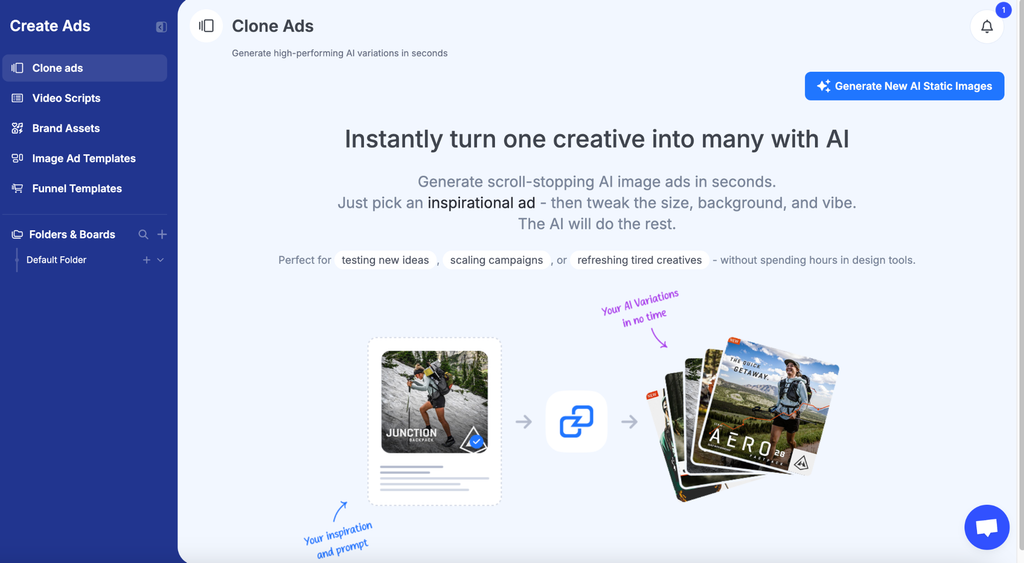
The Clone Ads tool takes an existing ad, yours or a competitor’s, and generates variations with new colors, avatars, formats, and styles, while the Image Ad Templates provide a library of fully editable image ad templates.
Canva
Canva’s carousel templates give you a starting point for card layouts before exporting as images or video. Its editor lets you design every card in one multi-page file, so fonts, colors, and spacing stay consistent across the set. Paid plans add a brand kit and one-click resizing for other placements.
Adobe Express
Adobe Express offers pre-built Facebook ad templates, which help you skip the blank-canvas stage when time is tight. It includes access to Adobe Stock images and fonts, and its resize tool adapts a finished design for other placements. Brand kits also keep logos, colors, and fonts consistent across every card.
Figma
Figma works best for teams that need editable, reusable layouts to keep cards and campaign variations consistent across multiple ad sets. Components let designers update a shared element, such as a logo or price badge, once and apply the change to every card. Real-time collaboration also lets copywriters and designers review cards in the same file before export.
Summary Table: Best Tools for Creating Facebook Carousel Ads
| Tool | Best for | Carousel-specific strength |
| GetHookd | Researching and cloning proven ads | Filter 65M+ ads by format to study competitor card sequences, then generate variations with Clone Ads and Image Ad Templates |
| Canva | Fast card design | Multi-page files keep fonts and spacing consistent across the set |
| Adobe Express | Template-led design | Adobe Stock access plus resizing for other placements |
| Figma | Design teams | Shared components update one element across every card |
Building Better Carousels With GetHookd
A carousel ad performs only as well as the structure behind it, and most advertisers skip structure when they’re rushing to launch. Getting the specs right and the sequence wrong still produces an ad that gets scrolled past.
With GetHookd, you can see how brands in your niche structure their carousels before you design a single card. Clone Ads turns a winning image into fresh card variations, and our Image Ad Templates give you editable designs to build from. Start your 7-day free trial and plan your next carousel around ads already winning in your niche.
Frequently Asked Questions (FAQs)
How many cards should a Facebook carousel ad have?
Facebook, Messenger, and Audience Network carousel ads support 2 to 10 cards. The right number depends on the template, with tutorials often using more cards than a simple offer sequence.
Can I use different links for each card in a carousel ad?
Yes. Each card in a carousel ad can carry its own destination URL, which is useful when promoting distinct products or services. Meta recommends using Ads Manager specifically when cards need individual destination URLs.
What is the recommended size for Facebook carousels?
Meta recommends a 1:1 square ratio at a resolution of at least 1,080 × 1,080 px for Facebook feed carousels. Other placements have different recommended sizes, including 1,080 × 1,080 px for Instagram feed and 1,080 × 1,920 px for Instagram Stories.
Why isn’t my carousel ad showing all the text I added?
Meta’s guidance for Facebook feed carousels recommends 80 characters of primary text, 45-character headlines, and 18-character link descriptions. Copy that runs longer than these recommendations gets truncated rather than resized to fit.
How does GetHookd help users create better carousel ads?
GetHookd lets you filter its ad library to show only carousel ads, so you can see how brands in your niche order their cards before planning your own. Brand Spy also shows how heavily a competitor relies on carousels compared with images and videos. When it’s time to design, Clone Ads and the image ad templates give you a quick starting point for each card.
*Note: Pricing and/or product availability mentioned in this post are subject to change. Please check our website for current pricing and stock information before making a purchase.