
Key Takeaways
- Topview AI’s agent turns a product URL, script, or reference video into editable ads, backed by 5,000+ avatars, 30+ languages, and several video models in one workspace.
- Monthly plans run from $8 to $112, annual billing cuts rates by up to 67% off the regular list price, and each tool spends credits differently, so output per plan varies.
- Trustpilot reviewers rate Topview AI 4.0 out of 5, praising its low per-second video cost and model range while flagging slow unlimited queues and unanswered support requests.
- Topview AI is a legitimate video ad generator, but its three-day refund window and credits that don’t roll over make a monthly plan the safer place to start.
- GetHookd shows which ads have run longest across 22M+ live Meta ads, updated daily, then turns proven concepts into full video scripts before you spend credits generating them.
Is Topview AI a Legit Video Ad Generator?
Topview AI appears to be a legitimate company, registered in Singapore as TOPVIEW PTE. LTD., with published terms, public pricing, and reviews on Trustpilot and G2. For marketers, the more useful question is whether a given plan delivers the output they expect.
That matters because Topview’s refund window is short and monthly credits don’t roll over, so committing to an annual plan before testing queue speeds can get expensive. Starting on a monthly plan gives teams room to judge generation speed and output quality first.
Output also depends on what goes in, since a video built on a weak concept is unlikely to perform well, no matter which plan produced it. We built GetHookd to help you start with stronger concepts by showing which competitor video ads have run the longest and which ones brands keep scaling. Our AI tools then transcribe those ads and write full scripts for your product, covering the hook, body, and call to action.
GetHookd: Give Your AI
22 Million Live Meta Ads

Your AI cannot see Meta's ad library. Now it can. Connect GetHookd to Claude, ChatGPT, Gemini, Cursor or Perplexity in about 30 seconds, no code needed. Ask in plain English what your market is running and get back the live Facebook and Instagram ads. Every answer comes back with the source ad attached, so you can check it yourself.
What You Get:- Brand Spy: Get told every time a competitor launches, with the launch date and how many ads they have live
- Shops: Open any Shopify store to see its monthly visitors, best sellers, and every Meta ad it runs
- Clone Ads: Turn any winning ad into new statics built off a creative already running in your market
Prefer clicking? Search and filter the library yourself in the app, on any plan.
Start a 7-Day Trial for $0Topview AI Core Features
Product-to-Video & UGC-Style Ad Generation
The product-to-video workflow starts the moment a user pastes in a product URL or uploads an image. The AI agent plans scenes, selects a generation model, and automatically assembles ad-style clips, cutting out the manual storyboarding step most video tools still require.
For campaign testing, Topview AI can batch-create short-form videos from one idea, testing different hooks, captions, aspect ratios, and edits. That matters for anyone running UGC-style ads, since testing several hook variations beats guessing which single version will perform.
Avatar Library, Product Avatars, & Voice Cloning
Paid plans unlock access to more than 5,000 public avatars, plus product avatars, photo-based avatars, and saved video avatars for repeat use across campaigns.
Avatar 4 caps individual videos at 180 seconds, while the Video Lip Sync feature stretches to 30 minutes or 24,000 words, which suits longer explainer or webinar-style content better than short ads. Voice, caption, and localization tools cover more than 30 languages, letting one avatar-led script scale into multiple markets without separate recording sessions.
Canvas Workspace & 3D Shot Composer
Every generated asset lands inside Topview AI’s Canvas, an editable workspace where scenes can be rearranged, swapped, or refined without restarting the entire video. The Board feature organizes these outputs so a team can track multiple ad variations without digging through scattered folders.
The 3D Shot Composer adds another layer, letting users stage characters and props inside a scene before generation instead of hoping the model guesses the right camera angle. This gives users more control than single-prompt text-to-video tools.
Multi-Model Video & Image Generation
Topview AI supports multiple AI video-generation models inside one account, letting users compare outputs from the same input side by side instead of committing credits to a single engine. This matters because model quality varies by use case; a model strong at realistic camera movement isn’t necessarily the best choice for avatar lip sync.
Users can also upload a reference video for the agent to analyze pacing, hooks, shot structure, camera language, and style, then apply those patterns to a new ad. That reference-based workflow functions closer to reverse-engineering a competitor’s winning ad than starting from a blank prompt.
What Are Topview AI’s Pricing Plans?
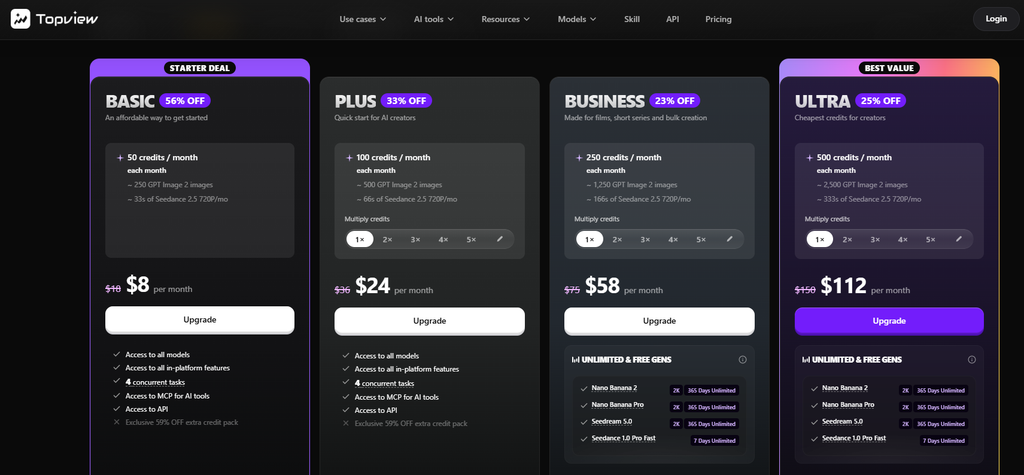
Topview AI offers four main pricing tiers for Individual plans: Basic, Plus, Business, and Ultra, each billed monthly or annually with different credit allotments, concurrent task limits, and model access.
Pricing is tied directly to credits, and each generation tool draws a different credit amount, so a flat subscription fee does not translate into a fixed number of finished ads.
- Basic Plan: Basic costs $8 per month, discounted from its regular $18, and includes 50 credits with four concurrent tasks. At 50 credits, Basic translates to roughly 250 GPT Image 2 images or about 33 seconds of Seedance 2.5 720p video per month, which fits light testing rather than ongoing production.
- Plus Plan: Plus costs $24 per month, discounted from $36, with 100 credits and four concurrent tasks. Annual billing brings it to $18 per month, billed at $216 per year, with 100 credits delivered monthly.
- Business Plan: Business costs $58 per month, discounted from $75, with 250 credits and eight concurrent tasks. Annual billing drops it to $44 per month ($528 per year), a 41% discount off the regular rate. Its 3,000 annual credits arrive upfront rather than trickling in monthly, which suits agencies with concentrated production sprints.
- Ultra Plan: Ultra costs $112 per month, discounted from $150, with 500 credits and 12 concurrent tasks. Annual billing brings it to roughly $50 per month, billed at $599.90 per year, a 67% discount off the regular monthly rate.
Teams can also choose a Team plan at $56 per seat per month, billed annually at $672 per seat, with a two-seat minimum totaling $1,344.
On monthly billing, Business and Ultra plans add access to the exclusive 59% discount on extra credit packs, along with unlimited generations on select models like Nano Banana 2 and Seedream 5.0. Monthly billing carries the steepest per-credit cost but offers flexibility for anyone testing the platform before committing to a year.
Topview AI Reviews
Topview AI Positive Feedback
On Trustpilot, Topview AI holds a 4.0 out of 5 TrustScore from 357 reviews as of November 2026. Positive reviewers point to the low cost of generating each second of video, the range of models on the Ultra plan, and the realistic video and camera movement the Canvas agent produces.
On G2, Topview AI scores 4.8 out of 5, though that rating comes from only six reviews. Reviewers there value creating avatar videos without recording new footage each time, which saves time on short-form content.
Topview AI Negative Feedback
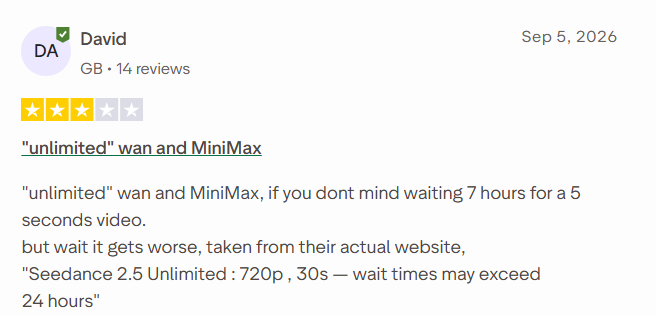
Among Trustpilot’s low ratings, slow unlimited-mode queues are the recurring theme. Unlimited generations run in a standard queue while credit-based generations get priority, so heavy unlimited use can mean long waits during busy periods.
The refund policy adds to that frustration for some users. Refunds are only available within three days of purchase and only if the credits from that payment are unused, which leaves little time to test queue speeds properly.
Support responsiveness also appears in multiple complaints, including requests about missing credits that went unanswered. For marketers comparing Topview AI with alternatives, inconsistent generation speed is the main risk these reviews point to.
Know Which Ads Are Worth Recreating With GetHookd
Topview AI combines product-to-video ads, avatars, localization, and video recreation in one workspace, but credit costs and queue times shape how far each plan goes. Even capable generation tools waste budget when the ad concept hasn’t been checked against what’s already working in your niche.
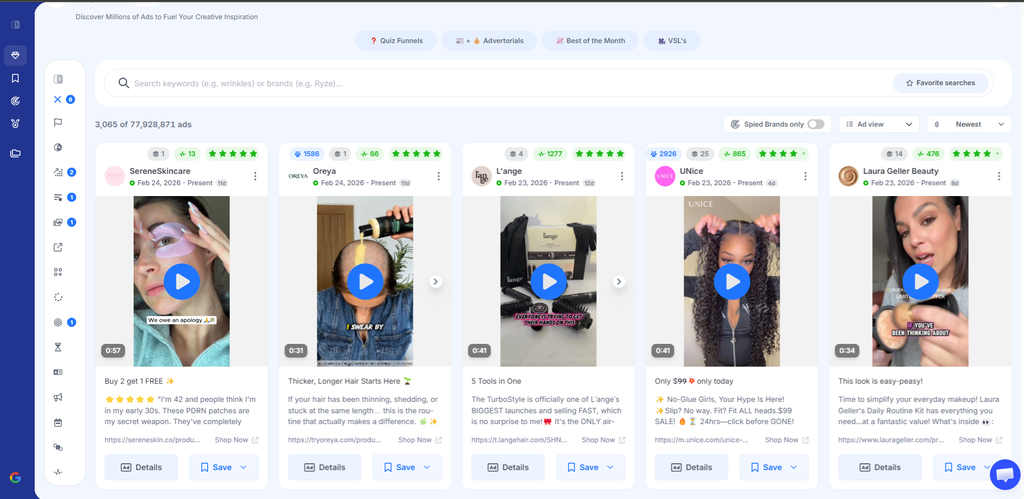
GetHookd tracks 22M+ live Meta ads across Facebook and Instagram, updated daily, so you can see which concepts brands keep running and scaling. Brand Spy notifies you every time a competitor launches, with the launch date and how many ads they have live. Our Ads Transcription and Video Scripts tools then turn those proven ads into scripts for your own videos. Start a 7-day trial for $0 and spend your video credits only on ideas with proof behind them.
Frequently Asked Questions (FAQs)
Is Topview AI safe to use for commercial ads?
Topview AI is safe for commercial use on paid plans, since Free Users are restricted from commercial applications under the platform’s terms. Paid subscribers retain rights to their uploaded content and generated output, though users uploading a real person’s likeness must hold documented consent.
Can I get a refund if Topview AI credits run out fast?
Refunds are only available within three days of purchase, and only if credits tied to that payment haven’t been used yet. If subscription bonuses or unlimited tasks were used, Topview deducts their value from any refundable amount, so fast credit use limits refund eligibility.
Does Topview AI use my videos to train its AI models?
By default, yes. Without an Enterprise Agreement, Topview AI may use uploaded content and generated output to train and improve its models. Users can opt out by emailing the brand, though the opt-out only applies going forward once confirmed, not retroactively.
What happens to unused credits when I cancel Topview AI?
Cancellation stops future billing but doesn’t refund unused credits from the current period, and access continues until the billing cycle ends. Closing the account entirely forfeits any remaining credits, and Topview keeps stored content and generated output internally on a permanent basis.
How does GetHookd compare to Topview AI for video ads?
Topview AI is built to generate videos. GetHookd is built to show you what to make first: 22M+ live Facebook and Instagram ads, how long each has been running, and Brand Spy alerts every time a competitor launches. Video Scripts then turns a proven ad into a script for your product, so your video credits go toward ideas with evidence behind them.
*Note: Pricing and/or product availability mentioned in this post are subject to change. Please check our website for current pricing and stock information before making a purchase.