Instagram Ads Not Converting: Common Causes & How to Fix
Key Takeaways
- Instagram ads typically fail to convert due to six recurring issues, including wrong audience targeting, weak creative that does not stop the scroll, landing pages disconnected from the ad, offers that give buyers no reason to act now, ignoring the awareness-consideration-decision buying journey, and selecting a campaign objective that does not match a revenue goal.
- Fixing targeting means running separate campaigns for cold, warm, and hot traffic, seeding lookalike audiences with at least 500 verified past purchasers rather than general site visitors, and using Meta Ads Manager breakdown reports to identify which demographics or placements are draining budget without producing conversions.
- Fixing creative and offers means testing problem-focused, results-focused, and curiosity-based hooks side by side using native UGC-style content that leads with transformation rather than the product itself, then restructuring weak offers with guarantees, free trials, or bundles before launching more creative variations.
- Fixing landing pages and campaign objectives means matching headlines, visuals, and offers to the ad creative, aiming for a Google PageSpeed score of 90 or higher on mobile, and always selecting the Sales objective with Purchase optimization (or Add to Cart if your Pixel has fewer than 50 weekly purchase events) when revenue is the goal.
- GetHookd gives you searchable access to 65M+ Meta ads to see which Instagram creatives, hooks, and landing pages competitors are actively scaling, plus AI-powered tools like Brand Spy, Creative Analyzer, Clone Ads, and Video Scripts that turn those proven concepts into testable ads in minutes.
Why Are My Instagram Ads Not Converting?
Instagram ads stop converting for six predictable reasons: targeting the wrong audience, a creative that fails to stop the scroll, landing pages that break the connection with the ad, offers that feel risky or average, ignoring the buying journey, and choosing a campaign objective that does not match your actual revenue goal.
Diagnosing which specific layer is leaking budget matters far more than rebuilding the whole campaign, because one misaligned element can quietly tank performance while every other piece is doing its job.
GetHookd makes that diagnosis faster by giving you a searchable database of 65M+ Meta ads, so you can see exactly which Instagram creatives, hooks, and landing pages competitors are scaling, then use Brand Spy, Clone Ads, and Video Scripts to turn those insights into testable creatives in minutes.

GetHookd: Turn Competitor Intelligence Into Your Next Winning Ad
GetHookd reveals which ads your competitors are actively scaling—not just running. Spy on their best-performing creatives, landing pages, and traffic strategies, then turn proven concepts into testable campaigns in seconds with AI-powered script generation and creative cloning.
What You Get:- ✓ Brand Spy to decode competitor ad strategies in real-time
- ✓ AI script generation and ad cloning for instant variations
- ✓ Performance scoring based on actual ad behavior, not vanity metrics
- ✓ Creative Analyzer to identify and scale your top performers
Common Causes Why Instagram Ads Are Not Converting (and How to Fix)
Cause #1: Wrong Audience Targeting
Targeting is where most campaigns go wrong first. Instagram’s ad platform offers many targeting options: interests, behaviors, demographics, custom audiences, and lookalikes.
That flexibility is both a strength and a trap. Too broad, and your ads show up in front of people who will never buy. Too narrow, and your frequency skyrockets, costs climb, and conversions stall.
The problem isn’t always obvious from the outside. An ad can get strong reach numbers and even decent click-through rates while still converting terribly because it’s reaching curious people, not buyers. Audience quality always matters more than audience size.
How to Fix It
Inside Meta Ads Manager, break down your campaign by age, gender, placement, and region. You’ll often find that a specific demographic or placement is eating budget without producing results.
From there, build structured audience layers based on buyer temperature (cold, warm, and hot), and run distinct campaigns for each tier.
How to Use Lookalike Audiences Correctly
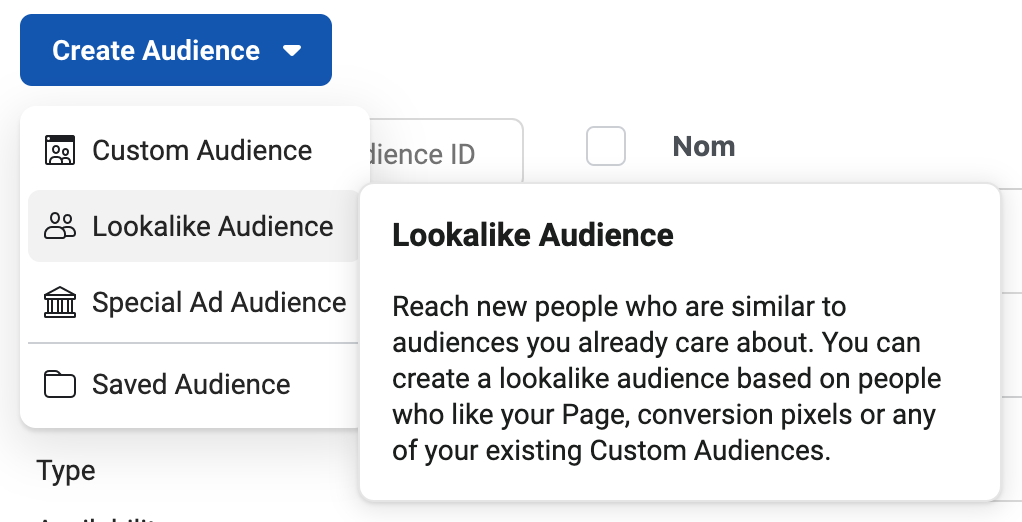
Lookalike audiences are powerful, but only when seeded with the right source data. Build your lookalikes from high-quality custom audiences (past purchasers or high-value leads), not from general website visitors or page followers.
Aim for a seed audience of at least 500 verified purchasers when building your lookalikes. The larger and cleaner your source data, the more accurately Meta can model new high-intent buyers.
Warm vs. Cold Traffic: Why the Difference Matters for Conversions
Cold traffic (people who have never heard of your brand) almost never converts on a direct purchase ad. They need education, trust-building, and social proof before they’re ready to buy.
Warm traffic, on the other hand (people who’ve visited your website, watched your videos, or engaged with your content), already knows who you are. These users convert at higher rates and should be retargeted with direct offers, testimonials, and urgency-based messaging.
Cause #2: Your Ad Creative Isn’t Stopping the Scroll
Even with perfect targeting, weak creative kills conversions before they start. Instagram is a visual-first platform where users scroll at speed. Your ad has roughly one to three seconds to interrupt that scroll and create enough curiosity or desire for someone to stop and engage.
How to Fix It
The creative that consistently wins on Instagram looks native to the platform. Raw, authentic, and direct content like user-generated style videos, behind-the-scenes clips, and real customer testimonials outperforms studio-quality production in most niches.
Test multiple creative angles simultaneously: a problem-focused hook, a results-focused hook, and a curiosity-based hook. Let the data tell you which works best, then double down on the winner.
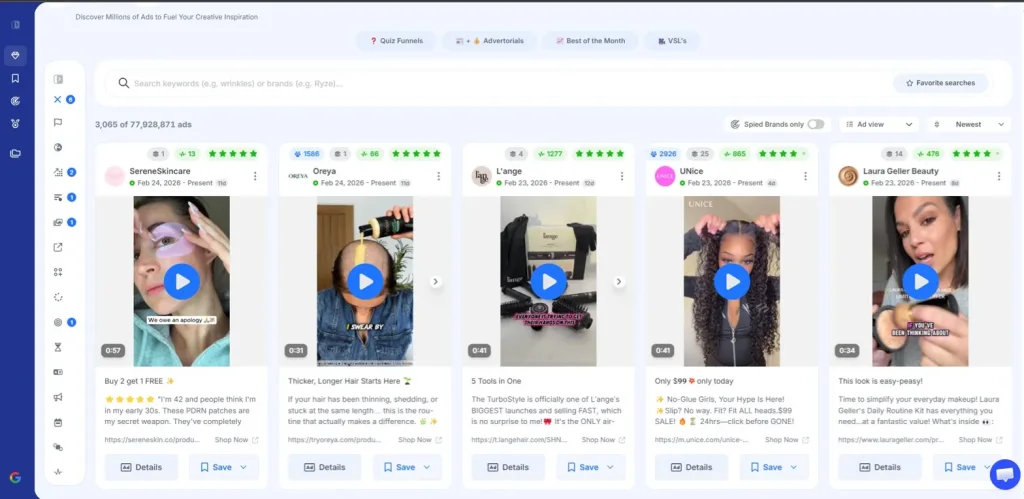
If you want to see real examples of each hook type before testing your own, GetHookd’s Explore Ads feature lets you search from a database of high-performing ad creatives by niche and format. That way, you can model angles already converted in your category instead of starting from scratch.
Show the Outcome, Not Just the Product
Buyers aren’t purchasing your product. Instead, they’re purchasing the outcome it creates. An ad that shows someone confidently wearing your clothing converts better than a flat product shot.
Lead with transformation and desire, and the product becomes the obvious solution rather than just an item for sale.
The First 3 Seconds of a Reel Decide Everything
For video ads and Reels, your hook is everything. The first frame needs to either create immediate curiosity, show a surprising result, or make a bold statement that stops the viewer mid-scroll.
Avoid logos, brand introductions, or slow build-ups at the start. Jump directly into the most compelling part of your message.
Cause #3: Your Landing Page Is Killing the Conversion
Getting someone to tap your ad is only half the battle. What happens after the click determines whether that visitor becomes a customer or a lost impression.
A landing page that loads slowly, feels disconnected from the ad, or buries the call to action will lose buyers who were genuinely interested. At this stage in the funnel, friction is your enemy.
How to Fix It
Your landing page needs to do three things immediately:
- Confirm the visitor is in the right place
- Reinforce the promise made in the ad
- Make the next step blindingly obvious.
Strip out any navigation menus, pop-ups, or competing calls-to-action that distract from the conversion goal.
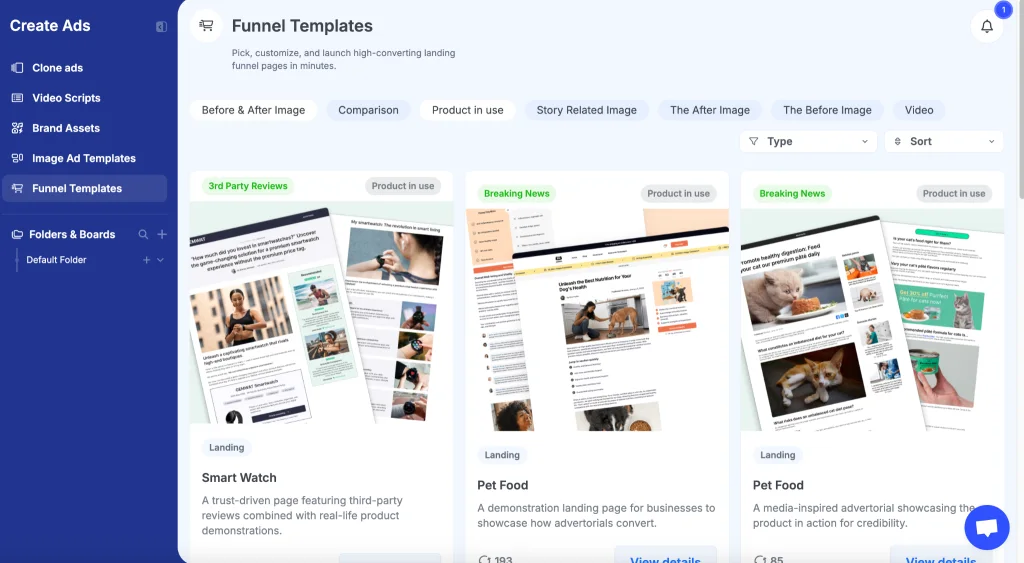
If building a high-converting landing page from scratch sounds like a heavy lift, our Funnel Templates give you proven, customizable layouts. These are modeled on pages already converting in different categories, like e-commerce, so you can launch a tested funnel in minutes rather than weeks.
Ensure Messaging Match Between Ad & Landing Page
If your ad promotes a 30% discount on running shoes and the landing page drops visitors on your general homepage, you’ve just created a jarring disconnect that destroys trust instantly.
Use the same language from your ad copy in your landing page headline. Mirror the visual style.
If your ad featured a customer testimonial, lead with social proof on the page. The visitor should feel like they’re moving forward in a seamless experience, not starting over from scratch.
Fix Page Loading Speed
Page speed is a silent conversion killer. A delay in load time can significantly reduce conversions.
Run your landing page through Google PageSpeed Insights and aim for 90 or higher on mobile. Compress images, eliminate render-blocking scripts, and consider moving to a faster hosting solution if your scores are consistently low.
Cause #4: Your Offer Isn’t Compelling Enough
Sometimes the targeting is right, the creative is strong, and the landing page is clean, but conversions still don’t come. In that case, the problem is the offer itself.
An offer that feels average, risky, or unclear gives potential buyers no real reason to act now instead of later. And “later” almost always means never.
How to Fix It
A compelling offer removes friction and creates urgency simultaneously. It answers the buyer’s core question: “Why should I buy this, from you, right now?”
If your offer can’t answer that question clearly and quickly, it needs to be restructured. The strongest offers combine real value with low perceived risk. Think free trials, strong guarantees, or bundles that make the price feel like an obvious deal.
A common mistake is running 10 different ad creatives while keeping the same weak offer. Change the offer first, then test creative variations around the winning structure.
Cause #5: You Are Ignoring the Buying Journey
Most buyers don’t purchase the first time they see an ad. Customers often need multiple touchpoints before making a purchase decision, especially for products priced above impulse-buy territory.
Running a single conversion campaign and expecting cold audiences to buy on first contact is one of the most expensive assumptions in digital advertising.
The buying journey moves through distinct stages: awareness, consideration, and decision. Each stage requires a different message, creative format, and call to action.
How to Fix It
Each campaign should have creative and copy matched to where that audience is in their decision-making process.
- Awareness stage: A person in the awareness stage needs to understand what problem you solve. Use short video ads, Reels, and educational content that introduce your brand and identify the problem you solve
- Consideration stage: Someone in the consideration stage needs reasons to trust you over competitors. Think testimonials, case studies, comparison content, and detailed product demonstrations
- Decision stage: A decision-stage buyer needs a reason to act right now. Use limited-time offers, strong guarantees, retargeting ads with direct calls-to-action, and abandoned cart follow-ups
Cause #6: Your Campaign Objective Doesn’t Match Your Goal
Choosing the wrong campaign objective is one of the most common reasons campaigns produce poor results despite reasonable spend. Meta’s ad system optimizes for the specific objective you select.
So if you choose Traffic when you actually want purchases, Meta will find people who love clicking links, not people who love buying things. These are two very different groups of people, and the algorithm treats them accordingly.
How to Fix It
Always align your campaign objective with the specific action you want users to take. If you want purchases, select the Sales objective and optimize for the Purchase conversion event.
If you want leads, use the Leads objective. If your Pixel doesn’t yet have enough Purchase data, Meta recommends at least 50 purchase events per week per ad set for proper optimization.
Start with Add to Cart as your conversion event to build algorithm data before switching to Purchase optimization. Never use Traffic or Engagement objectives when your end goal is revenue.
Ready to Build Instagram Ads That Actually Convert With GetHookd?
Instagram ads stop converting for predictable reasons: wrong audience, weak creative, a disconnected landing page, a flat offer, or a campaign objective that does not match the goal. Diagnosing the exact stage where buyers drop off matters more than rebuilding the entire funnel. Fix the right layer, and performance recovers faster than most marketers expect.
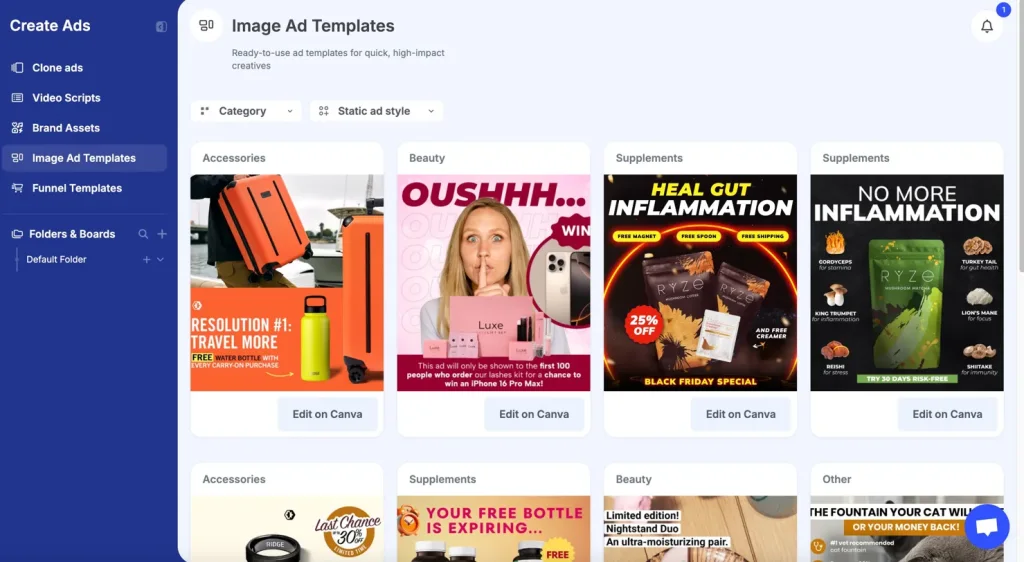
The fastest path back to profitable campaigns is starting with proof of what is already working in your niche. GetHookd’s Brand Spy feature reveals exactly which Instagram ads, hooks, and landing pages your competitors are actively scaling, while our Creative Analyzer scores your live ads against real performance signals so you know exactly what to fix. From there, AI-powered tools like Clone Ads, Video Scripts, and ad templates turn those insights into testable creatives in minutes.
Start your GetHookd free trial today.
Frequently Asked Questions (FAQs)
Why are my Instagram ads getting clicks but no conversions?
Clicks without conversions usually point to one of three issues: a landing page that does not match the ad, a weak offer, or the wrong audience clicking through.
Start by checking message continuity between ad and landing page, then evaluate whether your offer gives buyers a reason to act now.
How long should I run an Instagram ad before judging its performance?
Give new ad sets at least seven days, and ideally enough budget to accumulate around 50 conversion events at your chosen objective, so Meta’s algorithm can exit the learning phase.
Lower budgets need longer evaluation windows since data accumulates more slowly. Avoid significant edits during this window, as they reset learning.
How to fix an Instagram ad glitch?
Most Instagram ad glitches are resolved by clearing your browser cache, switching from the mobile app to the desktop Ads Manager, or refreshing the ad’s preview.
If the issue persists, check for policy violations in the Account Quality tab, ensure your payment method is active, and verify that your ad creative meets Meta’s current format and aspect ratio requirements.
For ads stuck in review beyond 24 hours, contact Meta Business Support directly through your Ads Manager.
How do I know which Instagram creative to use for my ads?
The fastest way is to model what is already converting in your niche. At GetHookd, our database of 65M+ Meta ads shows you the top-performing Instagram creatives in your category, including how long each ad has been running, which is one of the clearest signals that an advertiser is profitably scaling it.
Once you spot a winning angle, our AI tools and templates let you build your own testable variation and launch in minutes.
*Note: Pricing and/or product availability mentioned in this post are subject to change. Please check our website for current pricing and stock information before making a purchase.