

5 Best Facebook Carousel Ad Examples with Specs & Templates (2026)
Key Takeaways
- Facebook carousel ads let you show 2–10 images or videos in a single ad unit, each with its own link and CTA.
- The best Facebook carousel ad examples share common traits: a strong opening image, consistent visuals, and a clear progression toward action.
- Match your carousel structure to your goal: product showcase, multi-product catalog, before/after, or social proof.
- Stick to 1080 x 1080px, keep primary text under 125 characters (closer to 80 on mobile), and use 3–5 cards for optimal engagement.
- GetHookd lets you find which Facebook carousel ads competitors are actively scaling, pull their hooks and copy structure, and launch your own variations, all without switching tools.
Facebook Carousel Ad Specs for 2026
Facebook carousel ads let you showcase 2–10 images or videos in a single swipeable ad unit, with each card linking to its own URL. They’re a go-to format for e-commerce brands, product showcases, and sequential storytelling.
Below are the current specifications you need to set up your Facebook carousel ads correctly.
Image Specs
- Recommended size: 1080 x 1080 pixels (1:1 square)
- Aspect ratio: 1:1 (all cards must use the same ratio)
- File types: JPG or PNG
- Max file size: 30 MB per image
Video Specs
- Recommended size: 1080 x 1080 pixels (1:1 square)
- Aspect ratio: 1:1
- File types: MP4, MOV, or GIF
- Max file size: 4 GB
- Length: Up to 240 minutes technically supported, but 15–30 seconds is recommended for engagement
- Note: Videos autoplay muted, use captions or text overlays
Text Limits
- Primary text: Up to 2,200 characters allowed, but only ~125 are visible before truncation on most placements (some marketers aim for ~60–90 to ensure full visibility on smaller screens)
- Headline (per card): 40 characters max (25 recommended to avoid truncation)
- Description (per card): 18–20 characters (often hidden on mobile)
- Landing page URL: Required for each card
Carousel Card Limits
- Minimum: 2 cards
- Maximum: 10 cards
- Best practice: 3–5 cards typically perform best
You can always check Meta’s official ad guide for the most current requirements for carousel ads.
GetHookd: Turn Competitor Intelligence Into Your Next Winning Ad
65M+ Ads Analyzed | 4.8★ G2 Rating | 4.4★ Trustpilot Rating

Stop Guessing. Start Scaling:
GetHookd reveals which ads your competitors are actively scaling—not just running. Spy on their best-performing creatives, landing pages, and traffic strategies, then turn proven concepts into testable campaigns in seconds with AI-powered script generation and creative cloning.
What You Get:
- ✓ Brand Spy to decode competitor ad strategies in real-time
- ✓ AI script generation and ad cloning for instant variations
- ✓ Performance scoring based on actual ad behavior, not vanity metrics
- ✓ Creative Analyzer to identify and scale your top performers
5 Facebook Carousel Ad Examples
1. Airbnb — Unique Property Showcase

Airbnb uses the carousel format to showcase Lucy the Elephant, a quirky, one-of-a-kind rental in New Jersey. The first card grabs attention with the iconic elephant-shaped exterior, while the following cards take viewers inside to explore the unique living spaces.
The property sells itself, and the carousel lets it shine from every angle. Leading with the most striking image immediately hooks viewers, and interior shots satisfy their curiosity and build desire. It’s a masterclass in letting your product do the talking.
2. Rare Beauty — Soft Pinch Tinted Lip Oil
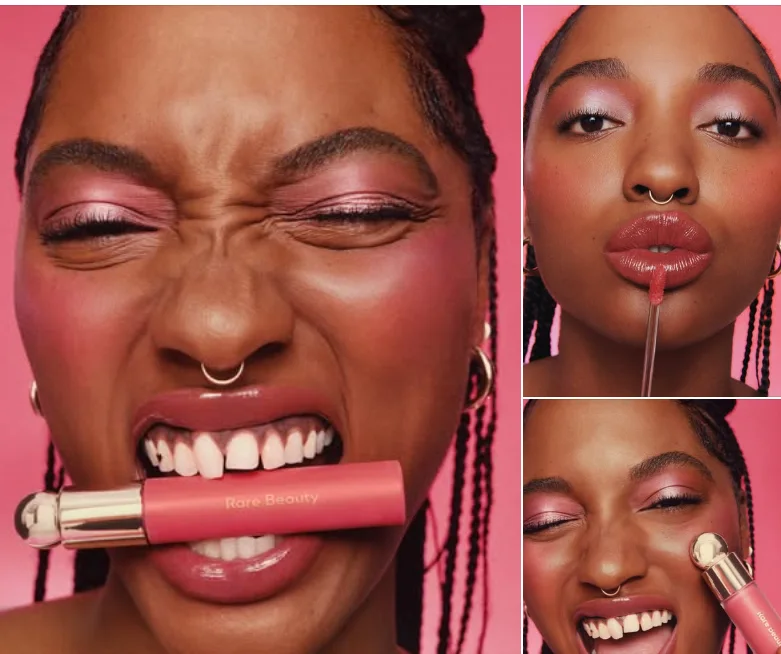
Rare Beauty uses the carousel format to introduce its new Soft Pinch Tinted Lip Oil. Each card showcases a different shade on a real person, letting shoppers see how the product looks on actual skin tones rather than just swatches.
The copy leads with personality (“It’s a Soft Pinch world, and we’re just living in it”) before diving into product benefits: lightweight, hydrating, non-sticky. Tagging the model and matching her lip oil shade to the blush she’s wearing creates a cohesive look shoppers can easily recreate.
3. Shein — Multi-Product Catalog
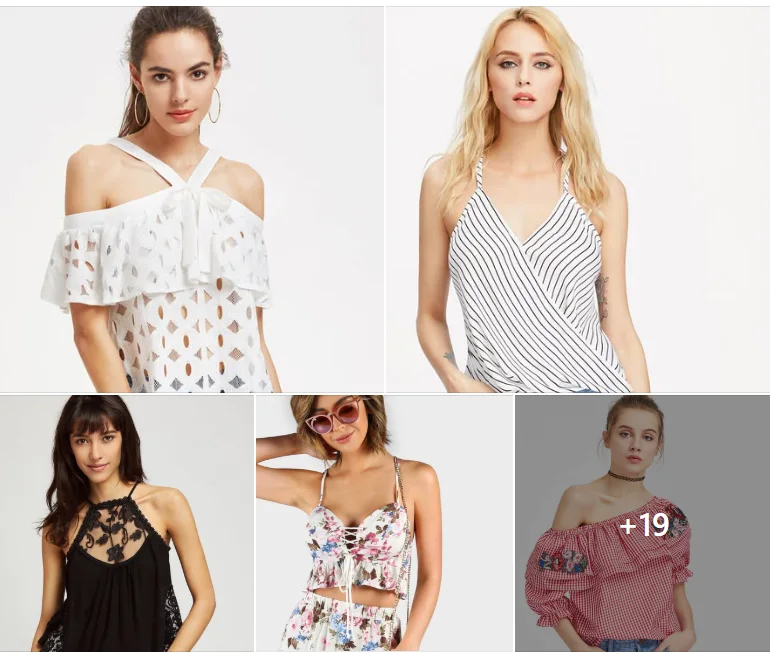
Shein uses the carousel format as a mini storefront, showcasing a variety of summer tops across multiple cards. Each card features a different style: lace, stripes, floral, gingham, giving shoppers plenty of options to browse in a single ad.
Featuring multiple products increases the chance that at least one catches the viewer’s eye. The clean white backgrounds keep the focus on the clothes, making it easy for shoppers to scan and find something they like quickly.
4. Starbucks — Pricing-Led Product Pairings
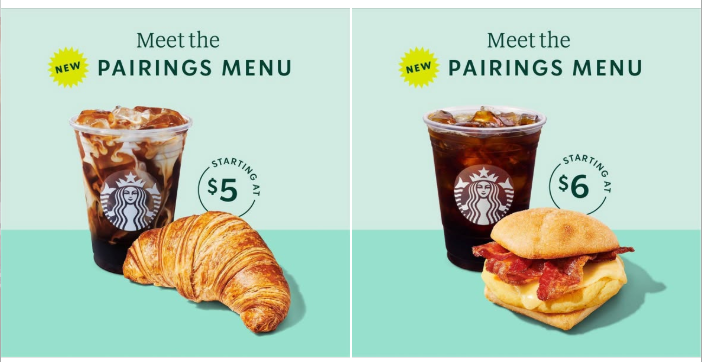
Starbucks uses the carousel format to promote its new Pairings Menu, featuring different drink-and-food combinations on each card. Each pairing has its own price point ($5, $6), making it easy for customers to see exactly what they’ll pay before they click.
Leading with price works especially well for value-focused promotions. The consistent layout across cards, same background, same “Meet the Pairings Menu” headline, creates visual cohesion while letting each combo stand on its own. It’s a simple, effective way to showcase multiple offers without overwhelming the viewer.
5. Nike — Multi-Angle Product Showcase
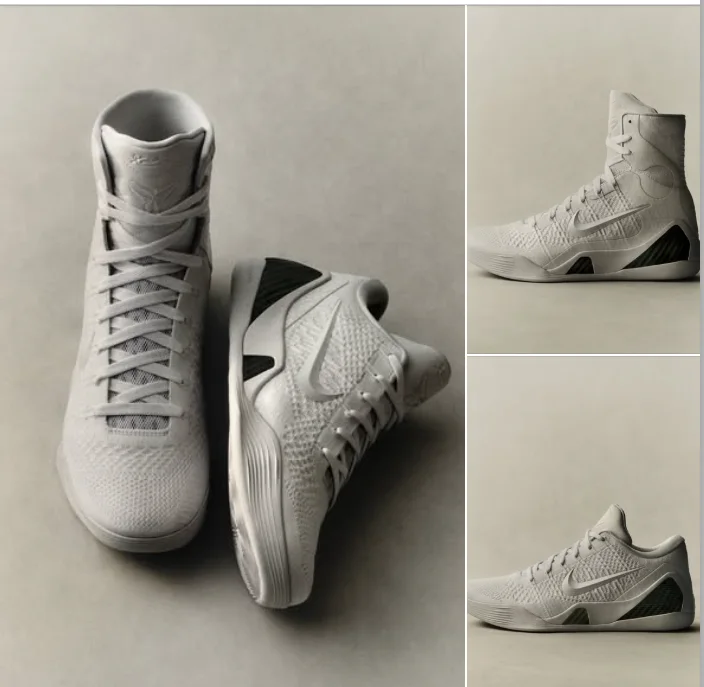
Nike uses the carousel format to highlight the Kobe 9 Elite Low HTM from every angle. Each card shows the same sneaker from three perspectives: side view, top-down, and close-up, giving buyers a complete view of the design details.
The minimalist gray-on-gray aesthetic keeps the focus entirely on the shoe. By dedicating multiple cards to a single product, Nike lets viewers examine the craftsmanship without having to click away. It’s a simple but effective approach for high-demand product drops.
Facebook Carousel Ad Templates for Different Use Cases
These card-by-card templates give you a proven structure to follow. Customize the visuals and copy to fit your brand while maintaining the flow. It’s designed to guide viewers from attention to action.
1. Product Showcase Template
Best for: Hero product launches, high-AOV items, single-product stores
| Card | Visual | Copy Focus |
|---|---|---|
| 1 | Hero product shot | Primary benefit headline |
| 2 | Close-up of feature #1 | Benefit, not spec |
| 3 | Close-up of feature #2 | Benefit, not spec |
| 4 | Product in context/lifestyle | Social proof or use case |
| 5 | Full product + price | CTA: “Shop Now” |
Pro tip: Keep lighting and background consistent across all cards so the product, not the photography, is what changes.
2. Multi-Product Catalog Template
Best for: General stores, fashion brands, seasonal collections, product variant testing
| Card | Visual | Copy Focus |
|---|---|---|
| 1 | Best-seller or hero product | Collection headline |
| 2 | Product option #2 | Style/color/variant name |
| 3 | Product option #3 | Style/color/variant name |
| 4 | Product option #4 | Style/color/variant name |
| 5 | Collection overview or top pick | CTA: “Browse All” |
Pro tip: Lead with your strongest product: it’s the hook that gets people swiping. Let Meta optimize card order after initial testing.
3. Before/After Template
Best for: Skincare, fitness, beauty, cleaning products, home improvement
| Card | Visual | Copy Focus |
|---|---|---|
| 1 | “Before” state | Problem headline |
| 2 | Transformation in progress | How it works (optional) |
| 3 | “After” result | Key outcome |
| 4 | Another “after” (different context) | Reinforce versatility |
| 5 | Product shot + price | CTA: “Get Yours” |
Pro tip: Use identical framing and lighting for before/after shots so the transformation is the focal point, not the photography conditions.
4. Social Proof Carousel Template
Best for: Brands with strong reviews, UGC-heavy stores, retargeting campaigns
| Card | Visual | Copy Focus |
|---|---|---|
| 1 | Product or brand hero shot | Bold benefit statement |
| 2 | Customer photo + quote | Specific result achieved |
| 3 | Different customer + quote | Different use case or audience |
| 4 | Third customer + quote | Reinforce credibility |
| 5 | Product + offer | CTA: “See Why They Switched” |
Pro tip: Feature customers from different segments so more viewers see themselves in the Facebook ad. Specific results beat generic praise: “cleared my acne in 2 weeks” wins over “love this product!”
Find Winning Carousel Ads Faster with GetHookd
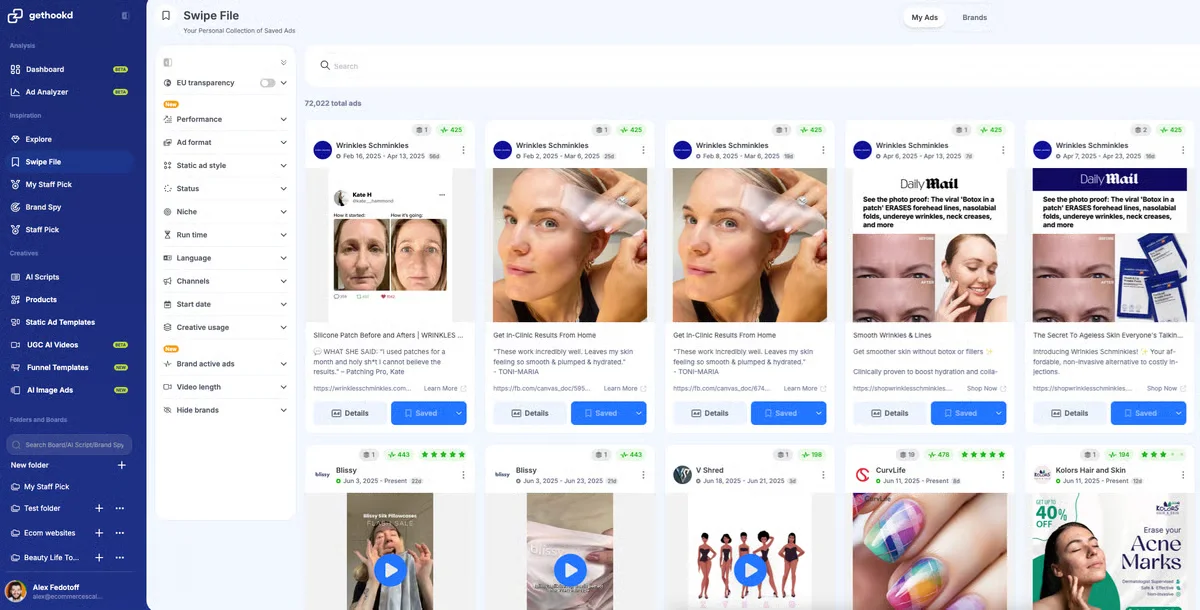
Building a high-converting carousel starts with data, not guesswork. Instead of scrolling endlessly through the Meta Ad Library, GetHookd lets you search over 65 million high-performing ads. You can filter by format, niche, or engagement signals to find proven carousel concepts in minutes. That way, you’re making creative decisions based on what’s actually scaling, not guessing from a static library.
Save any ad to your swipe file for later, or use Brand Spy to see which carousel ads your competitors are actively scaling. Our Performance Scoring highlights ads based on real engagement signals, so you know which creatives are actually driving results.
Ready to create? Our Clone Ads feature lets you generate fresh image variations from ads you’ve saved, while Image Ad Templates give you ready-made layouts you can customize to match your brand. If you spot a video worth testing, the AI Ads Transcription tool pulls the hooks, CTAs, and copy structure, giving you a head start on your next winning ad.
You can research, create, and launch Facebook carousel ads, all without switching tools.
Frequently Asked Questions (FAQs)
What is a carousel ad on Facebook?
A carousel ad is a Facebook ad format that lets you display 2 to 10 images or videos in a single ad unit.
Each card can include its own headline, description, link, and CTA, allowing viewers to swipe through multiple products, features, or messages without leaving their feed.
How to make a good Facebook carousel ad?
Start with your strongest image first; it’s the hook that stops the scroll. Keep visuals consistent (same lighting, backgrounds, or color scheme) so the carousel feels cohesive rather than chaotic.
Each card should have a clear purpose, whether that’s highlighting a feature, showing a product variant, or reinforcing social proof. End with a strong CTA that tells viewers exactly what to do next.
What do carousel ads look like?
Carousel ads appear in the Facebook feed as a row of swipeable cards. On mobile, users swipe left to see more cards; on desktop, they click arrows. Each card displays an image or video with a headline below, and the ad includes primary text above and a CTA button at the bottom.
Where can I find Facebook carousel ad examples?
You can browse the Facebook Ad Library for free, but it doesn’t show you which ads are actually performing. Tools like GetHookd let you search millions of Facebook ads, filter by format, and see which carousel ads brands are actively scaling, so you can build a strategy from proven performers rather than passively browsing.
*Note: Pricing and/or product availability mentioned in this post are subject to change. Please check our website for current pricing and stock information before making a purchase.